





Introduction
DevOps has become an important part of modern software development. Companies want to build, test, and release software faster. They also want applications to remain stable, secure, and easy to maintain. Traditional software teams often work in separate departments. Developers write code, testers check applications, and operations teams manage servers. This separation can create delays and communication problems. DevOps brings these teams closer through collaboration, automation, and shared responsibility. It helps organizations improve software delivery and manage infrastructure more efficiently.
However, starting a DevOps career can feel confusing. Beginners often see many tools, including Linux, Git, Jenkins, Docker, Kubernetes, AWS, Terraform, Ansible, and Prometheus. They may not know which technology to learn first.
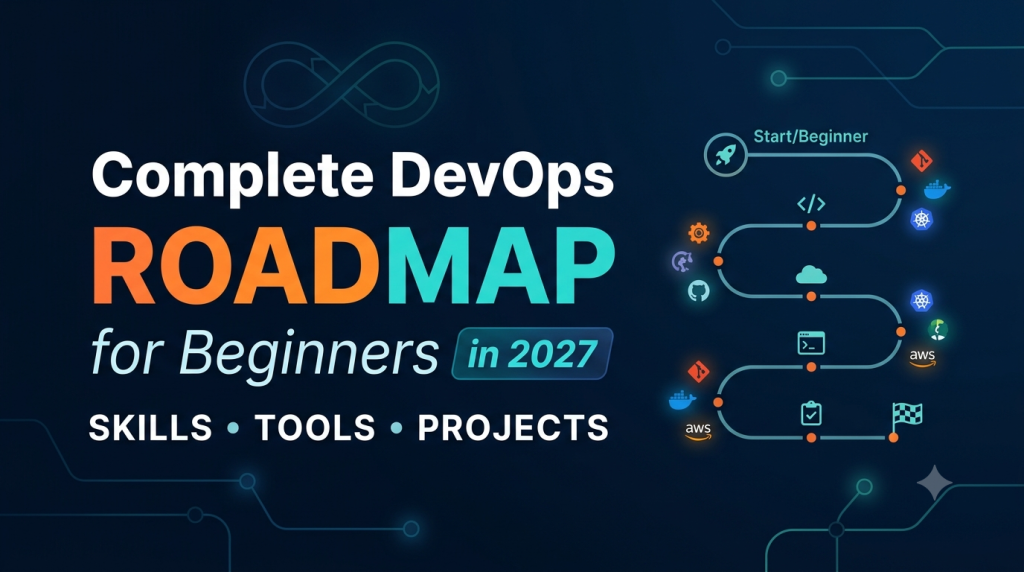
The best approach is to follow a clear learning path. Start with basic IT knowledge. Then learn Linux, networking, scripting, and version control. After that, move toward CI/CD, containers, cloud platforms, Infrastructure as Code, Kubernetes, and monitoring. This guide explains the complete DevOps roadmap for beginners in 2027. It covers essential skills, popular tools, practical projects, certifications, career opportunities, and a structured learning plan. Whether you are a student, fresher, developer, system administrator, or IT professional, this roadmap can help you begin your DevOps journey.
What Is DevOps?
DevOps is a combination of cultural practices, processes, and technologies. It brings software development and IT operations teams together. The main goal is to improve the way teams build, test, release, and operate applications. DevOps encourages collaboration and automation throughout the software delivery process.
The word DevOps combines two terms:
- Dev: Software development.
- Ops: IT operations.
Developers focus on writing and improving application code. Operations teams focus on infrastructure, deployment, performance, and availability. DevOps connects these responsibilities through shared workflows.
For example, imagine a developer makes a change to an application. The code is stored in Git. A CI/CD pipeline automatically builds the application and runs tests. The pipeline then creates a deployment package and releases it to a server or cloud platform.
Monitoring tools track the application’s health after deployment. If something fails, the team investigates the issue and improves the process. This workflow reduces manual work and supports more reliable software delivery.
Why Should Beginners Learn DevOps in 2027?
DevOps skills are useful across software development, cloud computing, infrastructure management, and platform engineering. Organizations use automation to manage complex systems. They also need engineers who understand how applications move from development to production.
Here are some reasons to consider learning DevOps.
1. Growing Use of Cloud Platforms
Many organizations run applications on AWS, Microsoft Azure, and Google Cloud. These environments require automation, monitoring, security, and infrastructure management.
DevOps engineers help teams manage cloud resources and application deployments.
2. Demand for Automation
Manual software builds and deployments can take time. They can also create errors.
DevOps engineers use scripts and automation tools to make repeated tasks faster and more consistent.
3. Modern Application Development
Organizations increasingly use containers, microservices, APIs, and cloud-native applications. DevOps knowledge helps engineers manage these systems.
4. Multiple Career Opportunities
DevOps skills can support careers in cloud engineering, Site Reliability Engineering, DevSecOps, platform engineering, and infrastructure automation.
5. Continuous Technical Learning
DevOps provides opportunities to work with different technologies. Engineers can improve their skills as tools and software delivery practices evolve.
Complete DevOps Roadmap for Beginners in 2027
A successful DevOps learning journey should follow a logical sequence. Beginners should build strong foundations before learning advanced technologies.
The following steps provide a practical roadmap.
Step 1: Understand IT Fundamentals and the Software Development Life Cycle
Before learning DevOps tools, understand how computers, applications, and software teams work.
Learn the basic concepts of software development and IT operations. Understand how applications are planned, developed, tested, released, and maintained.
Start with these topics:
- Computer and operating system fundamentals.
- Software Development Life Cycle (SDLC).
- Agile and Scrum methodologies.
- Application architecture.
- Development, testing, staging, and production environments.
- Basic databases.
- Application deployment.
- Release management.
- Quality assurance.
- Traditional IT operations and DevOps differences.
The Software Development Life Cycle explains the major stages of software development.
A typical SDLC includes:
- Planning.
- Requirements gathering.
- Design.
- Development.
- Testing.
- Deployment.
- Maintenance.
DevOps connects these stages through automation and continuous feedback.
For example, a development team may release a new application feature. The team stores the code in a shared repository. Automated tools build the application and run tests. Once the checks pass, the team can deploy the application.
Practical exercise: Draw a simple software delivery workflow. Show how code moves from development to testing, deployment, and monitoring.
Step 2: Learn Linux and Command-Line Administration
Linux is one of the most important foundations for DevOps engineering. Many cloud servers, containers, and application environments use Linux. DevOps engineers regularly use Linux commands to manage systems and troubleshoot problems.
Start with a Linux distribution such as Ubuntu. You can also explore Debian, Rocky Linux, or Red Hat Enterprise Linux.
Important Linux topics include:
- Linux file systems.
- Files and directories.
- Users and groups.
- File permissions.
- Process management.
- Service management.
- Package installation.
- Disk and memory management.
- SSH access.
- Environment variables.
- System logs.
- Cron jobs.
- Shell commands.
- Basic troubleshooting.
Practice these common commands:
| Command | Purpose |
|---|---|
pwd | Shows the current directory |
ls | Lists files and folders |
cd | Changes the current directory |
mkdir | Creates a directory |
cp | Copies files |
mv | Moves or renames files |
rm | Removes files |
cat | Displays file contents |
grep | Searches text |
find | Finds files |
chmod | Changes file permissions |
chown | Changes file ownership |
ps | Shows running processes |
top | Monitors system activity |
df | Displays disk usage |
systemctl | Manages system services |
You should also learn how to connect to remote servers using SSH. Understand how to check system logs and restart services.
Practical project: Install Ubuntu on a virtual machine. Create multiple users, configure file permissions, install a web server, and troubleshoot a service failure.
Step 3: Understand Computer Networking
Networking is another essential DevOps skill. Applications communicate through networks, and servers depend on reliable connectivity. Without networking knowledge, troubleshooting cloud applications and deployment problems becomes difficult.
Learn these important concepts:
- IP addresses.
- Public and private IP addresses.
- Subnetting.
- TCP and UDP.
- DNS.
- HTTP and HTTPS.
- Ports and protocols.
- SSL/TLS certificates.
- Firewalls.
- Routing.
- Gateways.
- Load balancers.
- Reverse proxies.
- VPN fundamentals.
- Network troubleshooting.
Understand what happens when a user opens a website. First, DNS helps resolve the website’s domain name. The browser then connects to the server. The server processes the request and returns a response. Learn how HTTP and HTTPS work. Understand why TLS certificates help protect communication.
Practice common networking commands:
pingcurltraceroutenslookupdigipss
Practical project: Configure a Linux web server. Connect to it from another machine. Check its open ports and troubleshoot a deliberately blocked network connection.
Step 4: Learn Programming and Scripting
DevOps engineers do not always write complete applications. However, they must understand programming logic and automation. Scripting helps automate tasks such as backups, deployments, log processing, system checks, and infrastructure operations.
Start with Bash scripting.
Learn:
- Variables.
- Conditions.
- Loops.
- Functions.
- Command-line arguments.
- Exit codes.
- File operations.
- Environment variables.
- Error handling.
- Process execution.
After learning Bash, explore Python.
Python is useful for automation, API communication, report generation, and integration between tools.
Important Python topics include:
- Variables and data types.
- Lists and dictionaries.
- Conditions and loops.
- Functions.
- Modules and packages.
- File handling.
- Exception handling.
- JSON processing.
- REST API requests.
- Basic automation.
You can use Visual Studio Code as your code editor.
Practical project: Create a Bash script that checks disk usage and running services. Then write a Python script that reads system information and generates a status report.
Step 5: Learn Git and Version Control
Git is a version control system. It helps teams track changes, manage source code, and collaborate. DevOps engineers use Git to manage application code, pipeline files, infrastructure configurations, and automation scripts.
Learn these Git concepts:
- Repositories.
- Commits.
- Branches.
- Merging.
- Rebasing.
- Pull requests.
- Merge conflicts.
- Tags.
- Branch protection.
- Code reviews.
Explore GitHub and GitLab. Both platforms provide tools for source code management and collaboration.
Practice these common commands:
| Command | Purpose |
|---|---|
git init | Creates a repository |
git clone | Copies a repository |
git status | Shows repository changes |
git add | Stages changes |
git commit | Saves a change |
git push | Sends changes to a remote repository |
git pull | Downloads and integrates changes |
git branch | Lists or manages branches |
git merge | Combines branches |
git log | Shows commit history |
Understand how teams use branches for new features and bug fixes.
Practical project: Create a GitHub repository. Add a sample application, create a feature branch, make changes, and open a pull request.
Step 6: Understand Build Automation and Software Testing
Before learning advanced CI/CD, understand how applications are built and tested. A build system converts source code into software packages or executable artifacts. Testing helps teams find errors before releasing applications. Different programming languages use different build tools.
Examples include:
- Maven for Java projects.
- Gradle for Java and other supported projects.
- npm for JavaScript projects.
- pip for Python package management.
Learn these concepts:
- Source code compilation.
- Dependency management.
- Build artifacts.
- Unit testing.
- Integration testing.
- Functional testing.
- Automated testing.
- Package repositories.
- Software versioning.
- Build failure analysis.
Understand why teams run tests before deploying applications.
Practical project: Build a small application. Run its tests, generate a build artifact, and store the artifact for later deployment.
Step 7: Learn Continuous Integration and Continuous Delivery
Continuous Integration and Continuous Delivery are central DevOps practices. Continuous Integration (CI) helps teams integrate code changes regularly. Automated builds and tests check whether new changes work correctly. Continuous Delivery (CD) prepares tested software for release through an automated process. Continuous Deployment automatically releases qualifying changes to production.
Learn these concepts:
- CI/CD architecture.
- Pipeline stages.
- Pipeline jobs.
- Automated builds.
- Automated tests.
- Pipeline triggers.
- Branch-based workflows.
- Build artifacts.
- Environment variables.
- Secure credentials.
- Deployment automation.
- Release approvals.
- Rollbacks.
Popular CI/CD tools include:
Jenkins
Jenkins is an automation server used to create flexible CI/CD pipelines. It supports plugins and pipeline definitions.
GitHub Actions
GitHub Actions helps automate workflows within GitHub repositories. Teams can run tests, build applications, and deploy software.
GitLab CI/CD
GitLab CI/CD provides integrated pipeline automation. Teams can define jobs and stages using configuration files.
Azure Pipelines
Azure Pipelines supports automated builds, testing, and deployments across different development environments.
Beginners should choose one CI/CD platform first. Learn how pipelines work before exploring several tools.
Practical project: Create a pipeline that automatically runs tests when code is pushed. Build the application and deploy it to a test server.
Step 8: Learn Docker and Containerization
Docker is a popular platform for building and running containers.
Containers package an application and its dependencies. This helps applications run consistently across different environments.
Learn these Docker concepts:
- Containers and virtual machines.
- Docker architecture.
- Docker Engine.
- Docker images.
- Docker containers.
- Dockerfiles.
- Image layers.
- Container networking.
- Persistent volumes.
- Environment variables.
- Image registries.
- Docker Compose.
- Container logs.
- Container troubleshooting.
Understand the difference between a Docker image and a container. An image is a packaged template. A container is a running instance created from that image. Learn how to build images and run containers. Practice exposing ports and connecting multiple services. Also understand basic container security. Use trusted base images, remove unnecessary packages, and avoid storing passwords in Dockerfiles.
Practical project: Containerize a simple web application and its database. Use Docker Compose to run both services together.
Step 9: Understand Cloud Computing
Cloud computing is an important part of modern DevOps environments. Cloud platforms provide computing, storage, networking, databases, and managed services. They allow organizations to build and operate applications without managing every physical server.
Choose one major cloud provider first:
- Amazon Web Services (AWS).
- Microsoft Azure.
- Google Cloud Platform (GCP).
Learn transferable cloud concepts instead of memorizing every service.
Important topics include:
- Cloud computing models.
- Virtual machines.
- Object storage.
- Block storage.
- Virtual networks.
- Subnets.
- Routing.
- Identity and Access Management.
- Security groups.
- Load balancers.
- Managed databases.
- DNS services.
- Autoscaling.
- Cloud monitoring.
- Cost management.
For AWS, explore EC2, S3, IAM, VPC, Elastic Load Balancing, and CloudWatch. For Azure, explore Virtual Machines, Virtual Networks, Microsoft Entra ID, Azure Storage, and Azure Monitor. For Google Cloud, explore Compute Engine, Cloud Storage, IAM, VPC, and Cloud Monitoring.
Practical project: Deploy a simple web application on a cloud virtual machine. Configure network access, permissions, and basic monitoring.
Step 10: Learn Infrastructure as Code
Infrastructure as Code (IaC) allows engineers to define infrastructure through configuration files. Instead of creating every resource manually, engineers describe the required infrastructure in code.
IaC improves consistency and makes infrastructure easier to review, reproduce, and manage.
Learn these concepts:
- Infrastructure provisioning.
- Declarative configuration.
- Variables and outputs.
- Reusable modules.
- State management.
- Infrastructure planning.
- Change reviews.
- Environment management.
- Configuration drift.
- Infrastructure version control.
Terraform
Terraform is widely used to provision infrastructure across cloud platforms. It allows engineers to describe resources through configuration files.
OpenTofu
OpenTofu is an open-source infrastructure as code tool. It provides a Terraform-compatible workflow.
Ansible
Ansible automates configuration management and operational tasks. Engineers use playbooks to configure servers and applications. Understand the difference between infrastructure provisioning and configuration management. Terraform or OpenTofu can create cloud resources. Ansible can configure the operating systems and applications running on those resources.
Practical project: Use Terraform to create a virtual network and cloud virtual machine. Use Ansible to install and configure a web server.
Step 11: Learn Kubernetes and Container Orchestration
After learning Docker, move toward Kubernetes.
Kubernetes is an open-source platform for managing containerized applications. It helps teams deploy, scale, and maintain containers across multiple machines.
Learn these Kubernetes concepts:
- Kubernetes architecture.
- Control plane.
- Worker nodes.
- Pods.
- Deployments.
- ReplicaSets.
- Services.
- Namespaces.
- ConfigMaps.
- Secrets.
- Persistent Volumes.
- Ingress.
- Network policies.
- Resource requests and limits.
- Health probes.
- Horizontal Pod Autoscaling.
- Helm charts.
Learn how to use kubectl to inspect and manage Kubernetes resources. Start with a local learning environment such as Minikube or kind. This allows you to practice without managing a large production cluster. Later, explore managed Kubernetes services such as Amazon EKS, Azure Kubernetes Service, and Google Kubernetes Engine.
Practical project: Deploy a Dockerized application to a local Kubernetes cluster. Configure a Deployment and Service. Test application scaling and recovery after a container failure.
Step 12: Learn Configuration Management and Automation
Configuration management helps keep systems consistent.
Ansible is a useful tool for automating server configuration and routine operational tasks.
Learn:
- Inventory files.
- Ansible modules.
- Playbooks.
- Variables.
- Templates.
- Roles.
- Handlers.
- Remote execution.
- Configuration automation.
- Application deployment.
Understand how Ansible connects to remote systems and applies configuration changes.
For example, an Ansible playbook can install a web server, create a user, configure a service, and start the application.
Practical project: Create an Ansible playbook that installs and configures a web server on multiple Linux virtual machines.
Step 13: Learn Monitoring, Logging, and Observability
Deploying an application is only part of the DevOps process. Teams must also understand how their applications behave after deployment. Monitoring helps engineers track system health and performance. Logging provides records of system and application activity. Observability helps teams understand internal system behavior through available telemetry.
Learn these important concepts:
- Metrics.
- Logs.
- Traces.
- Dashboards.
- Alerts.
- Application performance.
- Infrastructure monitoring.
- Error rates.
- Resource usage.
- Incident management.
- Service Level Indicators (SLIs).
- Service Level Objectives (SLOs).
Explore these tools:
Prometheus
Prometheus collects and stores metrics from applications and infrastructure. It is commonly used for monitoring cloud-native environments.
Grafana
Grafana creates dashboards from metrics and other data sources. Teams use it to visualize system performance.
ELK Stack
The ELK Stack combines Elasticsearch, Logstash, and Kibana. It helps collect, process, search, and visualize logs.
OpenTelemetry
OpenTelemetry provides tools and standards for collecting telemetry data, including metrics, logs, and traces.
Loki
Loki is a log aggregation system designed to work with Grafana.
Practical project: Deploy an application and configure Prometheus to collect metrics. Create a Grafana dashboard and set an alert for high resource usage.
Step 14: Understand DevSecOps and Security Fundamentals
Security should be part of the software delivery process. DevSecOps integrates security practices into development, deployment, and operations.
Learn these security concepts:
- Secure coding.
- Identity and Access Management.
- Least-privilege access.
- Secrets management.
- Dependency scanning.
- Static Application Security Testing (SAST).
- Dynamic Application Security Testing (DAST).
- Container image scanning.
- Infrastructure security.
- Cloud security.
- Network security.
- Audit logging.
- Vulnerability management.
Explore tools such as:
- SonarQube.
- Trivy.
- OWASP ZAP.
- Checkov.
- HashiCorp Vault.
- Gitleaks.
Understand how to detect exposed credentials and vulnerable software dependencies.
Learn why security checks should run automatically in CI/CD pipelines.
Practical project: Add dependency scanning and container image scanning to an existing CI/CD pipeline. Store credentials securely and prevent secrets from appearing in source code.
Step 15: Explore GitOps and Advanced DevOps Practices
Once you understand CI/CD, Kubernetes, and infrastructure automation, explore GitOps.
GitOps uses version-controlled configuration as the source of truth for application and infrastructure states.
It helps teams manage deployments through declarative configuration and automated reconciliation.
Explore these tools and practices:
- Argo CD.
- Flux.
- Helm.
- Kustomize.
- Progressive delivery.
- Blue-green deployments.
- Canary releases.
- Automated rollback.
- Policy as Code.
- Service mesh fundamentals.
- Platform engineering.
- Site Reliability Engineering.
- FinOps.
These are advanced topics. Beginners do not need to master them immediately.
Focus on understanding the foundations first. Then choose advanced areas based on your career goals.
DevOps Tools Beginners Should Learn in 2027
The DevOps ecosystem contains many tools. You do not need to learn every available product.
Start with tools that cover the major stages of software delivery.
| Skill Area | Tools to Explore | Main Learning Goal |
|---|---|---|
| Operating System | Linux, Ubuntu | Server administration |
| Networking | SSH, curl, DNS utilities | Network troubleshooting |
| Scripting | Bash, Python | Automation |
| Version Control | Git, GitHub, GitLab | Source code management |
| Build Automation | Maven, Gradle, npm | Application builds |
| CI/CD | Jenkins, GitHub Actions | Pipeline automation |
| Containers | Docker, Docker Compose | Application packaging |
| Cloud | AWS, Azure, GCP | Cloud infrastructure |
| Infrastructure as Code | Terraform, OpenTofu | Infrastructure provisioning |
| Configuration Management | Ansible | System configuration |
| Orchestration | Kubernetes, Helm | Container management |
| Monitoring | Prometheus, Grafana | Metrics and alerts |
| Observability | OpenTelemetry | Telemetry collection |
| Security | Trivy, SonarQube, OWASP ZAP | Security testing |
| GitOps | Argo CD, Flux | Declarative deployments |
Choose one tool in each major category. Learn its purpose and complete a practical task before moving to another tool.
Best DevOps Projects for Beginners in 2027
Practical projects help you understand how different technologies work together.
They also give you useful examples to discuss during interviews.
Project 1: Linux Server Administration
Set up a Linux virtual machine. Create users, manage permissions, install packages, and configure services.
Skills demonstrated: Linux administration, SSH, permissions, and troubleshooting.
Project 2: Automated System Monitoring Script
Write a Bash or Python script that checks disk usage, memory, CPU activity, and running services.
Skills demonstrated: Scripting, Linux commands, and automation.
Project 3: Git Collaboration Workflow
Create a Git repository. Add application files, create branches, commit changes, and open pull requests.
Skills demonstrated: Git, GitHub, branching, and collaboration.
Project 4: Automated CI/CD Pipeline
Build a pipeline that checks out source code, installs dependencies, runs tests, and creates an application artifact.
Skills demonstrated: CI/CD, build automation, and automated testing.
Project 5: Dockerized Web Application
Create a Dockerfile for a web application. Use Docker Compose to run it with a database.
Skills demonstrated: Containerization, networking, volumes, and application packaging.
Project 6: Cloud Application Deployment
Deploy a small application to AWS, Azure, or Google Cloud. Configure networking, permissions, and monitoring.
Skills demonstrated: Cloud infrastructure and application deployment.
Project 7: Infrastructure Automation With Terraform
Create infrastructure configuration files that provision a virtual machine and networking resources.
Skills demonstrated: Infrastructure as Code and cloud provisioning.
Project 8: Kubernetes Application Deployment
Deploy a containerized application to a Kubernetes cluster. Configure services, resource limits, and health checks.
Skills demonstrated: Kubernetes and container orchestration.
Project 9: Monitoring and Alerting Setup
Create dashboards and alerts for CPU usage, memory consumption, application availability, and request errors.
Skills demonstrated: Prometheus, Grafana, monitoring, and incident detection.
Project 10: Complete End-to-End DevOps Pipeline
Combine Git, CI/CD, Docker, Kubernetes, cloud infrastructure, Terraform, security scanning, and monitoring.
The project should show how a code change moves through automated testing, container creation, deployment, and production monitoring.
Skills demonstrated: End-to-end DevOps implementation and practical engineering problem-solving.
A 10-Month DevOps Learning Plan for Beginners in 2027
A structured schedule helps beginners avoid jumping between unrelated technologies.
The following example assumes around 8–12 hours of study and practice each week. Your progress may vary depending on your previous experience.
| Month | Learning Focus | Expected Practical Outcome |
|---|---|---|
| Month 1 | DevOps fundamentals and Linux | Manage a Linux virtual machine |
| Month 2 | Networking and Git | Configure a web server and Git repository |
| Month 3 | Bash and Python | Automate routine system tasks |
| Month 4 | Build tools and CI/CD | Create an automated build and test pipeline |
| Month 5 | Docker and Docker Compose | Containerize a web application |
| Month 6 | Cloud fundamentals | Deploy an application to a cloud platform |
| Month 7 | Terraform and Ansible | Provision and configure infrastructure |
| Month 8 | Kubernetes and Helm | Deploy and manage containerized applications |
| Month 9 | Monitoring and DevSecOps | Configure dashboards, alerts, and security checks |
| Month 10 | Projects and interview preparation | Publish a practical DevOps portfolio |
Month 1: Build Your Foundation
Study DevOps concepts, SDLC, and Linux. Practice basic system administration and command-line tasks.
Month 2: Learn Networking and Git
Understand network communication and version control. Practice working with remote repositories.
Month 3: Develop Scripting Skills
Learn Bash and Python. Automate simple system tasks and generate basic reports.
Month 4: Build Your First CI/CD Pipeline
Learn one CI/CD platform. Create an automated workflow for building and testing an application.
Month 5: Practice Docker
Build Docker images and run containers. Learn Docker Compose and container networking.
Month 6: Explore Cloud Computing
Choose AWS, Azure, or Google Cloud. Deploy a basic application and configure access controls.
Month 7: Learn Infrastructure Automation
Use Terraform to provision infrastructure. Practice Ansible for server configuration.
Month 8: Learn Kubernetes
Deploy applications to a local Kubernetes cluster. Explore Helm and basic troubleshooting.
Month 9: Add Monitoring and Security
Configure Prometheus and Grafana. Add basic security checks to your CI/CD pipeline.
Month 10: Complete Your Portfolio
Finish an end-to-end DevOps project. Document the architecture, tools, setup, and troubleshooting process.
At the end of each month, check whether you can perform the main tasks without following a tutorial. Practical understanding matters more than the number of courses completed.
Essential Skills Required to Become a DevOps Engineer
DevOps engineering requires a combination of technical knowledge and professional skills.
Technical Skills
Linux Administration: Understand files, permissions, processes, services, logs, and troubleshooting.
Networking: Learn IP addresses, DNS, HTTP, HTTPS, firewalls, and network connectivity.
Programming and Scripting: Use Bash and Python to automate repeated tasks.
Git and Version Control: Manage source code and collaborate through repositories.
CI/CD: Understand how applications are built, tested, and deployed automatically.
Docker: Package applications and manage containers.
Cloud Computing: Understand cloud infrastructure, identity, networking, and storage.
Infrastructure as Code: Use Terraform or OpenTofu to manage infrastructure.
Configuration Management: Use Ansible to configure systems and automate operations.
Kubernetes: Deploy and manage containerized applications.
Monitoring: Use metrics, logs, traces, and alerts to understand application health.
Security: Understand access control, secrets management, and basic vulnerability scanning.
Soft Skills
Problem-Solving: DevOps engineers investigate deployment failures and infrastructure issues. They must identify causes and find practical solutions.
Communication: DevOps work involves developers, testers, security teams, and operations professionals. Clear communication helps teams work together.
Teamwork: DevOps encourages shared responsibility. Engineers should support collaboration instead of working in isolated departments.
Time Management: Engineers often manage several tasks and incidents. Good planning helps them prioritize important work.
Continuous Learning: Tools and engineering practices change. DevOps professionals should regularly update their knowledge.
Documentation: Clear documentation helps teams understand processes, infrastructure, and troubleshooting steps.
Certifications That Can Support Your DevOps Career
Certifications can help structure your learning and demonstrate knowledge. However, they do not replace hands-on experience.
Choose certifications based on your skills and career goals.
Cloud Certifications
Cloud certifications help validate knowledge of cloud services and infrastructure.
Examples include:
- AWS Certified Cloud Practitioner.
- AWS Certified Solutions Architect – Associate.
- Microsoft Azure Administrator certifications.
- Microsoft Azure architecture certifications.
- Google Cloud Associate Cloud Engineer.
- Google Cloud Professional Cloud Architect.
Check the current certification names, exam requirements, and availability before preparing.
Kubernetes Certifications
Kubernetes certifications can support your understanding of container orchestration.
Examples include:
- Certified Kubernetes Administrator (CKA).
- Certified Kubernetes Application Developer (CKAD).
- Certified Kubernetes Security Specialist (CKS).
Linux Certifications
Linux certifications can help validate system administration knowledge.
Examples include:
- Red Hat Certified System Administrator (RHCSA).
- Linux Foundation Certified System Administrator (LFCS).
DevOps and Automation Training
Role-based DevOps training can help learners understand CI/CD, cloud infrastructure, containers, Kubernetes, automation, and monitoring.
A useful course should include practical labs and projects. It should also explain why engineers use particular tools and how those tools work together.
Do not collect certifications without developing practical skills. Focus on learning, implementation, and troubleshooting.
Career Opportunities After Learning DevOps
DevOps knowledge can support several career paths.
Your first role may depend on your education, previous experience, and practical skills.
| Career Role | Main Responsibility |
|---|---|
| Junior DevOps Engineer | Support automation, deployment, and infrastructure tasks |
| DevOps Engineer | Build and maintain software delivery workflows |
| Cloud Engineer | Manage cloud infrastructure and services |
| Site Reliability Engineer | Improve application reliability and availability |
| DevSecOps Engineer | Integrate security into software delivery |
| Platform Engineer | Build internal developer platforms |
| Build and Release Engineer | Manage application builds and releases |
| Kubernetes Engineer | Manage container orchestration environments |
| DevOps Architect | Design enterprise DevOps systems |
You do not need to choose a specialization immediately. Build broad DevOps fundamentals first. Then explore the career area that interests you most.
How to Prepare for Your First DevOps Job
Getting your first DevOps job requires practical knowledge and clear communication.
Employers want to understand what you can do, not just which tools you have studied.
Follow these recommendations:
- Learn Linux and networking fundamentals.
- Become comfortable with Git and scripting.
- Build at least three to five practical projects.
- Learn one CI/CD platform properly.
- Practice Docker and Kubernetes.
- Understand one cloud platform.
- Learn Terraform and basic configuration management.
- Practice monitoring and troubleshooting.
- Publish suitable projects on GitHub.
- Prepare to explain your technical decisions.
Your resume should include:
- Professional summary.
- Technical skills.
- Education.
- Certifications.
- Practical projects.
- Internship or work experience.
- GitHub portfolio.
Describe your project work clearly.
For example:
- Built a CI/CD pipeline that automatically tested and deployed an application.
- Containerized a web application using Docker.
- Provisioned cloud infrastructure using Terraform.
- Configured Kubernetes deployments and services.
- Created monitoring dashboards using Prometheus and Grafana.
Avoid listing tools that you cannot explain or use.
Common Mistakes Beginners Should Avoid
Many beginners struggle because they try to learn too many technologies at once.
Avoid these common mistakes.
1. Learning Tools Without Understanding Concepts
Do not memorize commands without understanding why you use them. Learn the basic concepts behind each technology.
2. Skipping Linux Fundamentals
Linux is important in many DevOps environments. Build a strong foundation before moving to advanced tools.
3. Ignoring Networking
Many deployment and cloud problems involve networking. Understand DNS, ports, protocols, routing, and firewalls.
4. Learning Too Many Cloud Platforms
Start with one cloud provider. Learn its core services before exploring another platform.
5. Skipping Practical Projects
Watching tutorials is not enough. Build and troubleshoot applications yourself.
6. Focusing Only on Certifications
Certifications can support your learning, but practical implementation is equally important.
7. Ignoring Security
Learn basic security practices from the beginning. Protect credentials, manage permissions, and understand common vulnerabilities.
8. Trying Kubernetes Too Early
Understand Docker and container basics before learning Kubernetes. This makes orchestration concepts easier to understand.
9. Ignoring Monitoring
A successful deployment does not guarantee a healthy application. Learn how to monitor services and investigate failures.
10. Not Documenting Your Work
Document your projects and explain the problems you solved. This helps employers and other engineers understand your skills.
How DevOpsSchool.jp Can Help Beginners Learn DevOps
Learning DevOps requires a combination of technical knowledge, guided practice, and real-world implementation.
DevOpsSchool.jp can be explored as a learning resource for professionals interested in DevOps and related engineering disciplines.
A structured learning path can help beginners understand topics in the correct order. It can also help experienced IT professionals improve their knowledge of cloud platforms, automation, CI/CD, containers, and modern infrastructure.
When choosing a training program, look for:
- Beginner-friendly learning material.
- Clear technical explanations.
- Practical demonstrations.
- Hands-on labs.
- Real-world project exercises.
- Guidance on common tools.
- Troubleshooting practice.
- Interview preparation.
- Learning paths for different experience levels.
A useful training program should explain how technologies work together. For example, learners should understand how Git, Jenkins, Docker, Kubernetes, and cloud infrastructure support a complete software delivery process.
Beginners should start with Linux, networking, Git, and scripting. Experienced developers and system administrators can build on their existing knowledge and focus on automation, cloud infrastructure, and deployment practices.
You can explore the learning resources and available training options at DevOpsSchool.jp to identify a suitable path for your goals.
Future Trends in DevOps Beyond 2027
DevOps continues to evolve as organizations adopt cloud-native applications, AI-assisted development, and platform engineering.
Several areas are becoming increasingly important.
1. Platform Engineering
Platform engineering focuses on building internal platforms for development teams.
These platforms provide reusable tools, services, templates, and workflows. They help developers build and deploy applications with less manual effort.
2. GitOps
GitOps uses version-controlled configuration to manage application and infrastructure states.
Tools such as Argo CD and Flux help automate Kubernetes deployments and maintain the desired configuration.
3. DevSecOps
Security is becoming a shared responsibility across software development and operations.
Teams are adding automated code scanning, dependency checks, secrets detection, and container security to their pipelines.
4. Artificial Intelligence in DevOps
AI-assisted tools can help engineers analyze logs, summarize incidents, generate scripts, and investigate system problems.
However, engineers must review generated results and understand their limitations.
5. Observability
Modern applications use distributed services and cloud infrastructure. Metrics, logs, and traces help teams understand system behavior.
OpenTelemetry and observability platforms support the collection and analysis of this information.
6. FinOps and Cloud Cost Management
Cloud spending can grow quickly when resources are not managed properly.
FinOps practices help organizations understand cloud costs and make better resource decisions.
7. SRE Practices
Site Reliability Engineering focuses on service availability, performance, incident management, and automation.
DevOps engineers can expand their skills by learning SLIs, SLOs, error budgets, and reliability engineering.
Top 10 Frequently Asked Questions About the DevOps Roadmap for Beginners
1. What is the best DevOps roadmap for beginners in 2027?
A practical DevOps roadmap begins with IT fundamentals, Linux, networking, Bash or Python, and Git. After that, learn build automation, CI/CD, Docker, cloud computing, Terraform, Ansible, Kubernetes, monitoring, and security. Complete practical projects at every stage. This approach helps beginners understand how the technologies work together instead of learning disconnected tools.
2. Can a complete beginner learn DevOps in 2027?
Yes. A complete beginner can learn DevOps by following a structured learning path. Previous experience in programming, networking, or system administration can help, but it is not required to start. Begin with Linux and networking fundamentals. Then develop scripting skills and move toward CI/CD, containers, cloud platforms, and infrastructure automation.
3. How long does it take to learn DevOps?
The learning time depends on your background, study schedule, and practical experience. A beginner studying regularly may use a 10-month roadmap to build a foundation across major DevOps areas. However, becoming job-ready may take longer. Focus on completing projects and solving practical problems rather than following a fixed deadline.
4. Do I need coding skills to become a DevOps Engineer?
Yes, basic programming and scripting skills are useful. DevOps engineers often use Bash and Python to automate tasks, process files, communicate with APIs, and manage infrastructure. You do not need to become an advanced software developer at the beginning. However, you should understand programming logic and be able to write and troubleshoot simple scripts.
5. Is Linux necessary for learning DevOps?
Linux is an important skill for DevOps because many servers, containers, and cloud workloads use Linux-based systems. Learn file management, users, permissions, processes, services, SSH, logs, and networking commands. Practical Linux knowledge makes it easier to understand Docker, Kubernetes, and cloud infrastructure.
6. Which DevOps tools should I learn first?
Start with Linux, Git, Bash, and Python. Then choose one CI/CD platform, such as Jenkins or GitHub Actions. Learn Docker for containerization and select one cloud platform. After that, explore Terraform, Ansible, Kubernetes, Prometheus, and Grafana. Learning one tool properly in each category is more useful than collecting superficial knowledge of many tools.
7. Is Kubernetes required to become a DevOps Engineer?
Kubernetes is important in many modern cloud-native environments, but beginners should not start with it. First learn Linux, networking, Docker, and CI/CD. Then understand Kubernetes architecture, Pods, Deployments, Services, ConfigMaps, Secrets, and basic troubleshooting. The importance of Kubernetes depends on the organization’s requirements and the role.
8. Which cloud platform is best for DevOps beginners?
AWS, Microsoft Azure, and Google Cloud are all useful platforms. Beginners should choose one based on their learning goals and the types of roles they want to pursue. Start with virtual machines, networking, storage, IAM, load balancing, and monitoring. The core cloud concepts are transferable across providers.
9. What projects should beginners build for a DevOps portfolio?
Build projects that demonstrate practical engineering skills. Good examples include Linux automation scripts, Git collaboration workflows, CI/CD pipelines, Dockerized applications, cloud deployments, Terraform infrastructure, Kubernetes deployments, and monitoring dashboards. An end-to-end project combining several technologies can demonstrate a stronger understanding of real DevOps workflows.
10. Can freshers apply for DevOps jobs?
Yes. Freshers can apply for junior DevOps, cloud support, infrastructure support, build and release, and related entry-level roles. Requirements vary between organizations. Freshers should build strong fundamentals, complete practical projects, understand basic cloud and automation workflows, and prepare to explain their work during interviews.
Conclusion
A complete DevOps roadmap for beginners in 2027 should focus on learning the right skills in the right order.
Start with IT fundamentals, Linux, networking, programming, and Git. Then move toward build automation, CI/CD, Docker, cloud computing, Terraform, Ansible, and Kubernetes.
After building these foundations, learn monitoring, observability, DevSecOps, and GitOps. As your experience grows, explore advanced areas such as platform engineering and Site Reliability Engineering.
The best way to learn DevOps is through practical implementation. Build small projects, automate repeated tasks, deploy applications, investigate failures, and document your work.
You do not need to master every available tool. Focus on understanding the concepts and learning how technologies work together.
With consistent practice, a structured learning plan, and a strong project portfolio, beginners can develop the skills needed to pursue DevOps opportunities in 2027 and beyond.