





Imagine a software development team working on a high-traffic e-commerce platform. After weeks of collaborative coding, unit testing, and peer reviews, the developers complete a major redesign of the checkout payment gateway. The business stakeholders are excited, but they face a dilemma: they want the code deployed to production so that infrastructure teams can verify stability, but they do not want the new payment flow exposed to all customers until marketing campaigns and customer support training are fully aligned. Traditionally, teams faced a difficult choice. They could hold back code merging until release day, leading to massive, risky merge conflicts and delayed feedback loops. Alternatively, they could deploy everything at once, risking widespread customer disruption if an unpredicted bug surfaced in production.
This scenario highlights a fundamental truth in modern software engineering: deploying application code and releasing functionality to end-users do not need to happen at the same time. Feature Flags and CI/CD (Continuous Integration and Continuous Delivery) solve this mismatch by decoupling the technical act of shipping code from the business decision of exposing a feature. When integrated correctly, feature flags allow teams to push unfinished or hidden code to production safely, test features in live environments, control user access dynamically, and execute gradual rollouts. For teams aiming to master these modern workflows, platforms like DevOpsSchool offer comprehensive learning resources for building robust DevOps and CI/CD practices. By treating feature flags as an extension of the CI/CD pipeline, organizations can transform high-risk releases into routine, controlled operational events.
Understand How Feature Flags Work Inside an Application
At its core, a feature flag (or feature toggle) is a conditional statement in code that evaluates a rule to determine whether a specific block of functionality should execute. Instead of relying solely on hardcoded variables or static configuration files, an application evaluates flags dynamically based on runtime context, such as user identity, geographic location, device type, or percentage-based allocation.
Core Evaluation Concepts
- Boolean Feature Flags: The simplest toggle type, returning either
trueorfalseto enable or disable a specific code path. - Configuration-Based Toggles: Flags managed through external configuration files or environment variables that dictate application behavior.
- User and Group Targeting: Rules that enable a feature only for specific user IDs, internal employee emails, or designated beta-tester groups.
- Environment-Specific Flags: Configurations that ensure a feature is active in staging or development environments while remaining disabled in production.
- Percentage-Based Rollouts: Mechanisms that hash user identifiers to expose a feature to an exact percentage of traffic (e.g., 5% of users), gradually increasing the percentage over time.
- Server-Side and Client-Side Evaluation: Server-side evaluation occurs securely within backend services where user attributes are readily available. Client-side evaluation occurs in web browsers or mobile apps, often requiring lightweight SDKs and cached configurations.
- Remote Configuration and Local Evaluation: Modern systems fetch configuration payloads asynchronously and evaluate flags locally in memory to ensure sub-millisecond response times.
- Default Behaviour and Fallback: When a flag evaluation service experiences latency or network failure, the application must fall back to a safe, predefined default state to prevent application crashes.
Code Example: Checking a Feature Flag
Below is a simple JavaScript / Node.js example demonstrating how an application evaluates a feature flag before rendering a new checkout flow:
JavaScript
const featureFlagClient = require('./featureFlagSdk');

async function handleCheckout(req, res) {
    const user = {
        key: req.user.id,
        email: req.user.email,
        groups: req.user.groups
    };

    // Evaluate the feature flag with user context
    const isNewCheckoutEnabled = await featureFlagClient.variation(
        'new-checkout-flow',
        user,
        false // Default fallback value
    );

    if (isNewCheckoutEnabled) {
        return renderRedesignedCheckout(req, res);
    } else {
        return renderLegacyCheckout(req, res);
    }
}
Feature Flags vs. Environment Variables
It is crucial to distinguish feature flags from traditional environment variables (process.env):
- Environment Variables are typically static, set at application startup, and apply globally to an entire instance or container. Changing them usually requires restarting the application or redeploying the container.
- Feature Flags are dynamic, evaluated per-request or per-user session, and can be toggled instantly in a centralized dashboard without requiring a new deployment or application restart.
Identify the Different Types of Feature Flags
Not all flags serve the same purpose. Categorizing flags by their expected lifespan and intent helps prevent technical debt and clarifies ownership across engineering and product teams.
Release Flags
Release flags separate code deployment from user exposure. They act as gatekeepers for new features currently under development or awaiting business sign-off. Once a feature is fully rolled out to 100% of users and validated, release flags are removed from the codebase.
Experiment Flags
Experiment flags support A/B testing and multivariate analysis. They route users into different variations (e.g., Control vs. Variant A vs. Variant B) to measure conversion rates, user engagement, or performance metrics. These flags persist only as long as the experiment runs.
Operational Flags
Operational flags give system operators and site reliability engineers (SREs) real-time control over system performance and resource utilization. For instance, during peak traffic events like flash sales, an operational flag can disable resource-intensive recommendation widgets to preserve core checkout stability.
Permission Flags
Permission flags control access to specific software tiers or entitlements, such as enterprise-only features or internal administrative tools. Unlike temporary release flags, permission flags often remain in the codebase indefinitely as part of the application’s authorization logic.
Kill Switches
Kill switches are emergency toggles designed to instantly disable misbehaving services, third-party integrations, or newly introduced components that degrade system health. They prioritize immediate incident mitigation over graceful degradation.
Ownership and Lifecycle Note: Confusing short-term release flags with long-term permission controls leads to cluttered codebases. Release and experiment flags must have defined expiration dates and designated owners responsible for eventual removal.
Connect Feature Flags to the CI/CD Pipeline
Feature flags do not replace CI/CD pipelines; rather, they complete them. Continuous Integration ensures that code is continuously tested and merged into shared repositories, while Continuous Deployment ensures that validated artifacts reach production environments automatically. Feature flags fit seamlessly into this automated lifecycle.
[Developer Commit]
       │
       ▼
[CI Build & Unit Tests]
       │
       ▼
[Automated Flag State Testing (Enabled/Disabled)]
       │
       ▼
[Artifact Packaging & Publishing]
       │
       ▼
[CD Automated Deployment to Production]
       │
       ▼
[Centralized Feature Flag Control (Targeting & Rollout)]
The Integrated Workflow
- Code Creation: A developer writes code for a new feature, wrapping the implementation in a conditional feature flag check.
- Version Control: The code is committed and pushed to the version control repository (e.g., Git).
- Continuous Integration (CI): Automated CI servers execute builds, static analysis, linting, and unit tests.
- Pipeline Validation: Automated test suites execute tests against both enabled and disabled flag states to prevent dead-code regressions.
- Artifact Publishing: The validated application build artifact is packaged and stored in an artifact repository.
- Continuous Delivery (CD): The CD pipeline automatically deploys the exact same artifact across staging and production environments.
- Flag Configuration: Once the artifact is safely running in production, release engineers or product managers update the feature flag control system to enable the feature for internal testers or a small percentage of users.
- Monitoring & Progressive Expansion: Observability tools monitor system health as the rollout expands.
- Cleanup: Once the feature is universally accepted, the flag and its conditional checks are removed from the codebase.
Crucially, changing a feature flag’s state in production requires zero new builds, zero pipeline runs, and zero redeployments. The application code already contains the logic; the flag simply tells it which path to execute.
Design a Reliable Feature Flag Strategy
Introducing feature flags without governance can quickly lead to configuration chaos, orphan flags, and unpredictable application behavior. A reliable feature flag strategy requires strict naming conventions, clear ownership, and well-defined defaults.
Essential Design Principles
- Meaningful Flag Names: Adopt a structured naming convention that indicates purpose, domain, and creator. For example,
release-checkout-stripe-integration-q3immediately tells any engineer what the flag does and when it was introduced. - Clear Metadata: Every flag should include a description of its business purpose, linked Jira ticket or project ID, and expected retirement date.
- Unique Ownership: Assign an individual engineer or team to every flag. Unowned flags linger indefinitely because no one knows if they are safe to remove.
- Safe Default Values: Always define what the application should do if the flag service is unreachable. Default values should generally preserve existing, stable behavior (
falsefor new features). - Targeting Rules & Environments: Keep staging and production flag configurations isolated. Ensure user attributes used for targeting (like emails or tenant IDs) are transmitted securely.
Implement Feature Flags in a Sample CI/CD Project
Let us examine a practical implementation using a lightweight Node.js web application and a configuration-backed feature toggle pattern.
Application Preparation
Suppose we have an application route that displays a user dashboard. We want to introduce a new analytics widget without disrupting the existing view.
app.js:
JavaScript
const express = require('express');
const app = express();
const flagConfig = require('./config/featureFlags.json');

app.get('/dashboard', (req, res) => {
    const userTier = req.query.tier || 'standard';

    // Evaluate feature flag based on configuration
    const showAdvancedAnalytics = flagConfig.advancedAnalytics.enabled &&
        (flagConfig.advancedAnalytics.targetTiers.includes(userTier));

    res.render('dashboard', {
        user: req.query.user,
        analyticsWidget: showAdvancedAnalytics ? 'AdvancedCharts' : 'BasicSummary'
    });
});

app.listen(3000, () => console.log('Server running on port 3000'));
config/featureFlags.json:
JSON
{
  "advancedAnalytics": {
    "enabled": false,
    "targetTiers": ["enterprise", "beta"]
  }
}
Pipeline Integration (CI/CD Script Example)
In our CI/CD pipeline (e.g., GitHub Actions or GitLab CI), automated tests validate application behavior under both flag states:
YAML
# Example CI Test Stage
jobs:
  test:
    runs-on: ubuntu-latest
    steps:
      - uses: actions/checkout@v4
      - name: Install Dependencies
        run: npm install
      - name: Run Tests with Flags Disabled
        run: FEATURE_ANALYTICS=false npm test
      - name: Run Tests with Flags Enabled
        run: FEATURE_ANALYTICS=true npm test
By executing tests across multiple flag states, the CI pipeline ensures that neither state introduces syntax errors, null reference exceptions, or broken UI renders.
Test More Than One Release Path
When feature flags are introduced, the combinatorial complexity of testing increases significantly. If an application contains $n$ active independent feature flags, the number of potential execution paths scales as $2^n$. Testing every possible combination is impractical, so teams must adopt a strategic approach.
Testing Responsibilities
- Enabled-State Testing: Verify that the new feature functions correctly, integrates with backend APIs, and meets performance expectations when active.
- Disabled-State Testing: Confirm that legacy code paths remain completely unaffected when the flag is turned off.
- Targeting & Rollout Tests: Validate that user segmentation hashes consistently and targets the correct user cohorts.
- Failure Mode Testing: Simulate feature flag service outages or network timeouts to verify that default fallbacks engage smoothly.
Prioritizing Combinations
Instead of blind combinatorial testing, teams should focus on:
- Baseline State: All flags disabled (current production standard).
- Individual States: Each new flag enabled independently with all other flags disabled.
- Critical Intersections: Combinations of flags that touch shared data models or UI components.
Use Feature Flags for Controlled Releases
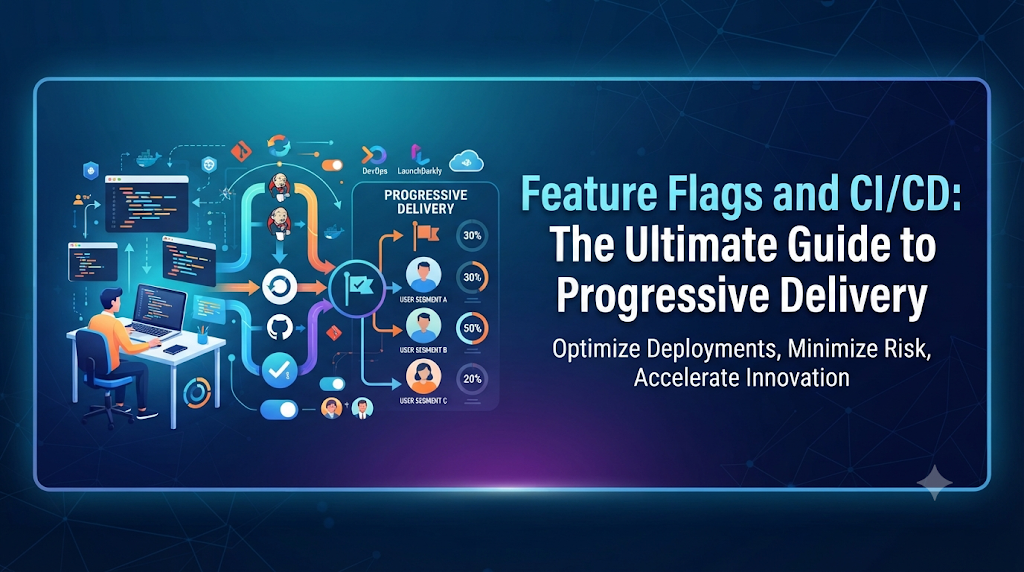
Feature flags enable Progressive Delivery—the practice of combining continuous delivery with fine-grained, business-controlled user exposure. Instead of releasing code to 100% of users simultaneously, teams can execute structured rollout phases.
Progressive Rollout Stages
- Internal Team-Only Release: Enable the feature exclusively for internal employees and QA engineers using email domain targeting (
@company.com). - Beta Customer Group: Expand access to opt-in beta testers or select partner organizations willing to provide early feedback.
- Percentage-Based Rollout: Increase traffic exposure gradually (e.g., 1% $\rightarrow$ 5% $\rightarrow$ 25% $\rightarrow$ 50% $\rightarrow$ 100%).
- Full General Availability: Once stability metrics confirm success, the feature is active for all users, paving the way for flag cleanup.
Feature Flags vs. Canary Deployments
It is important not to confuse feature flags with canary deployments:
- Canary Deployments operate at the infrastructure layer, routing a percentage of network traffic to a newly deployed set of server instances or containers running a new application version.
- Feature Flags operate at the application layer, controlling specific features within a single running application instance.
Teams often use both together: a canary deployment validates overall infrastructure and server-side stability for a new build, while feature flags control individual user-facing capabilities within that build.
Monitor Feature Behaviour After Activation
Successfully deploying code and enabling a feature does not guarantee that the feature is functioning correctly. Comprehensive observability is essential for catching silent failures before they impact the broader user base.
Key Metrics to Monitor
- Application Error Rates: Track HTTP 5xx errors, unhandled exceptions, and log spikes immediately following flag activation.
- Response Latency: Measure API response times and database query durations for users with the feature enabled versus disabled.
- Business Conversion Metrics: Monitor checkout completion rates, sign-up funnels, or click-through rates associated with the new feature.
- Resource Consumption: Observe CPU and memory utilization patterns to detect resource leaks introduced by new code paths.
- Flag Evaluation Failures: Monitor SDK connectivity issues or fallback triggers to ensure flag configurations are evaluating reliably.
Decision Scenario
Suppose a team rolls out a new recommendation engine to 10% of users. Within 15 minutes, automated monitoring detects a 15% increase in database query latency and a slight uptick in cart abandonment. Rather than scrambling to initiate a full application rollback, the product manager instantly toggles the feature flag off in the management console. Traffic gracefully falls back to the legacy recommendation engine, restoring system performance while developers investigate the database query inefficiency in staging.
Automate Feature Flag Management in CI/CD
As organizations scale, manual flag creation and deletion become bottlenecks. Automating the feature flag lifecycle ensures governance without slowing down developer velocity.
Automation Best Practices
- Infrastructure as Code (IaC): Define permanent configuration flags or initial defaults in version-controlled configuration repositories.
- API Integration: Use feature flag provider REST APIs or CLI tools within CI/CD pipelines to automatically create flags for new feature branches or clean up stale flags during pull request merges.
- Automated Rollout Triggers: Connect monitoring alerts (e.g., Datadog or Prometheus) to feature flag management APIs so that if error rates exceed a defined threshold, the flag automatically disables itself.
- Expiration Reminders: Configure automated notifications alerting feature owners when a flag has exceeded its expected lifespan.
Security and Governance for Feature Flags
Because feature flags can dynamically alter application behavior and expose sensitive capabilities in production, they require strict security controls and governance policies.
Governance Checklist
- Role-Based Access Control (RBAC): Restrict production flag modification permissions to authorized leads, release managers, or product owners.
- Audit Trails: Maintain immutable logs recording who changed a flag, when the change occurred, and what the previous and new values were.
- Secure API Keys: Protect client-side and server-side SDK credentials. Never expose administrative write tokens in public client-side repositories.
- Backend Authorization: Never rely on client-side feature flags for security or access control. Hiding a UI button with a flag does not prevent a malicious user from invoking underlying backend API endpoints directly. True authorization must always be enforced on the server side.
Manage Technical Debt From Old Flags
Unremoved feature flags represent a insidious form of technical debt. When temporary release flags are left in codebases long after rollouts complete, they create dead-code branches, complicate maintenance, and increase cognitive load for engineers.
The Flag Cleanup Process
- Identify Purpose: Review the flag’s original ticket and current rollout status (confirmed at 100% exposure for over 30 days).
- Select Permanent Path: Determine which code branch (enabled or disabled) is now the permanent standard.
- Remove Checks: Strip out the conditional feature flag wrapper statements across the codebase.
- Prune Dead Code: Delete unused functions, classes, and UI components associated with obsolete variations.
- Run Test Suites: Execute comprehensive unit and integration tests to ensure no regressions were introduced during cleanup.
- Retire Flag: Delete the flag definition from the centralized feature flag management platform.
Making flag cleanup a mandatory requirement of the “Definition of Done” for feature completion prevents technical debt from accumulating.
Compare Feature Flag Management Approaches
Teams can choose from several approaches when implementing feature flags, ranging from custom internal solutions to enterprise-grade third-party platforms.
| Approach | SDK Support | Targeting Capabilities | Experimentation | Operational Complexity | Cost & Scalability |
| Configuration Files | Minimal (DIY) | Basic (Static) | None | Low | Free, but hard to scale |
| Open-Source (e.g., Unleash, Flagsmith) | Good across stacks | Moderate to Advanced | Limited | Medium | Self-hosted infrastructure cost |
| Commercial SaaS (e.g., LaunchDarkly, GrowthBook) | Comprehensive | Advanced & Granular | Robust A/B Testing | Low (Managed) | Subscription-based, highly scalable |
| OpenFeature (Abstraction Standard) | Universal via API | Depends on backend provider | Varies | Low | Standardized abstraction layer |
The right choice depends on organizational scale, regulatory compliance requirements, budget, and internal maintenance capacity.
Common Problems Teams Encounter
- Unowned Flags: Creating flags without assigning a clear owner, leading to permanent technical debt.
- Forgetting Cleanup: Leaving completed release flags active in codebases for months or years.
- Testing Only Enabled States: Failing to test fallback behavior and disabled code paths in CI pipelines.
- Confusing Flags with Auth: Using client-side toggles to secure sensitive administrative endpoints.
- Inconsistent Naming: Using vague or unstructured flag names that confuse team members.
- Uncontrolled Changes: Allowing unrestricted team members to modify production flags without approval workflows.
Measure the Impact of Feature Flags on Delivery
To justify investment in feature flag tooling and processes, engineering leaders track specific performance indicators:
- Deployment Frequency: How often code is successfully deployed to production.
- Lead Time for Changes: The duration from code commit to production release.
- Change Failure Rate: The percentage of deployments causing production incidents.
- Mean Time to Recovery (MTTR): How quickly teams can mitigate incidents using kill switches or flag disabling.
- Stale Flag Count: The number of flags active past their planned expiration dates.
Frequently Asked Questions
What are feature flags in CI/CD?
Feature flags are conditional statements in application code managed by external configurations. They allow teams to deploy code to production while keeping specific features hidden until ready for release.
How do feature flags improve continuous delivery?
They decouple code deployment from feature release, enabling teams to merge code frequently into main branches without waiting for complete user-facing readiness.
Can feature flags be used with continuous deployment?
Yes. Continuous deployment automates pushing every validated commit to production; feature flags ensure those changes remain dormant until business approval is granted.
Do feature flags require a separate deployment?
No. Changing a feature flag’s state takes effect instantly via dynamic configuration updates without requiring a new build, test cycle, or deployment.
What is the difference between feature flags and canary deployment?
Canary deployments operate at the infrastructure level, routing server traffic to new instances. Feature flags operate at the application level, controlling specific functional blocks within running instances.
How should feature flags be tested?
Teams must test enabled states, disabled states, default fallbacks, targeting rules, and failure scenarios within automated CI pipelines.
Are feature flags a security mechanism?
No. Client-side feature flags only control visibility. Secure authorization must always be enforced on backend servers regardless of flag states.
How can teams manage too many feature flags?
By enforcing strict naming conventions, assigning explicit owners, setting expiration dates, and automating flag cleanup during pull request reviews.
When should a feature flag be removed?
Once a feature has reached 100% rollout stability and all associated business validation is complete, the flag and its conditional checks should be promptly purged from the codebase.
Conclusion: Make Feature Release a Controlled Decision
Feature flags transform software delivery by separating the technical mechanics of code deployment from the strategic timing of feature release. When integrated thoughtfully into CI/CD pipelines, comprehensive test suites, observability platforms, and governance frameworks, feature flags give engineering and product teams unprecedented control over how functionality reaches users.
Mastering this discipline requires treating feature flags not as casual, temporary switches, but as managed components of the software development lifecycle. With clear ownership, rigorous testing, secure targeting, and disciplined cleanup, organizations can achieve continuous delivery with confidence, agility, and minimal operational risk.