







Modern software delivery requires speed, but moving fast without automated security leaves applications exposed to critical vulnerabilities. Traditional security reviews create release bottlenecks by treating testing as a final, manual checkpoint. By shifting security left and automating vulnerability scanning directly within CI/CD pipeline jobs, engineering teams can detect flaws in source code, dependencies, containers, and infrastructure configurations the moment code is committed. For professionals looking to master these practices and bridge the gap between development speed and robust security, comprehensive guidance is available through specialized training programs like DevOpsSchool. This ensures that security weaknesses are identified and remediated long before code ever reaches production.
1. Opening Scenario: Catch Vulnerabilities Before Deployment
Imagine a fast-paced development team building a modern cloud-native web application. Developers write code, push changes to a Git repository, and trigger a build pipeline that compiles the application, runs unit tests, and pushes a Docker container image to the cloud registry for staging deployment.
Everything appears successful. The tests pass, and the application deploys seamlessly. However, a critical remote code execution vulnerability exists deep within a third-party logging library included in the project dependencies, and an outdated operating system base image contains unpatched system libraries. Because the pipeline only checked for functional correctness, neither the developers nor the operations team knew about these flaws until security researchers flagged the exposed service weeks later.
An automated CI/CD security pipeline would have changed this outcome entirely. By embedding vulnerability scanners directly into the pipeline jobs, the build process would have intercepted the vulnerable dependency during the dependency analysis stage and blocked the container image build during the container scanning stage. Instead of discovering the flaw in production, the team would have received immediate, automated feedback pointing to the exact library version requiring an update—long before the code ever reached a staging or production environment.
The core goal of pipeline security is making vulnerability detection a continuous, automated part of software delivery rather than a separate, manual activity performed only before release.
2. Understand Vulnerability Scanning in CI/CD Pipelines
Vulnerability scanning is the automated process of inspecting software artifacts, source code, configurations, and runtime environments against known databases of security weaknesses, common vulnerabilities and exposures (CVEs), and secure coding standards.
Why Detect Vulnerabilities Early?
Detecting vulnerabilities early in the software development lifecycle (SDLC) drastically reduces remediation costs and security risk. Fixing a security flaw during the initial coding or pull-request phase takes minutes and costs very little. Fixing that same flaw after deployment involves emergency patching, potential data exposure, incident response, and disrupted business operations.
Automated Scanning in DevSecOps
DevSecOps integrates security into every phase of the CI/CD workflow. Automated scanning replaces manual code reviews and periodic penetration tests with continuous, repeatable checks that execute on every commit, pull request, or scheduled pipeline run.
Security Testing vs. Vulnerability Management
- Security Testing: The active or passive execution of tools (such as scanners or test suites) to discover flaws, misconfigurations, and code weaknesses.
- Vulnerability Management: The broader operational process of prioritizing, tracking, assigning, remediating, and auditing discovered findings over time.
Improving Detection Consistency
Manual security reviews are prone to human error, fatigue, and inconsistency. Different reviewers look for different things, and tight deadlines often lead to skipped checks. Automated pipelines execute the exact same scanning rules, policies, and quality gates on every single build, ensuring absolute consistency across all codebases.
Beyond Source Code
Modern applications are complex ecosystems built from diverse components. Effective CI/CD security cannot focus solely on application source code; it must encompass every layer of the delivery pipeline, from raw code to compiled binaries, third-party packages, container images, and cloud infrastructure definitions.
3. Identify What Needs to Be Scanned
A comprehensive DevSecOps pipeline evaluates multiple layers of the software delivery environment. Each layer introduces distinct attack surfaces and requires specialized scanning techniques.
Source Code
Source code analysis detects insecure coding patterns, injection flaws, hardcoded logic errors, and common application weaknesses before compilation. This scanning occurs immediately after code checkout.
Dependencies
Modern applications rely heavily on open-source libraries and third-party packages. Software Composition Analysis (SCA) scans project dependency manifests and lockfiles to detect known vulnerabilities in imported packages.
Container Images
Containerized applications bundle code, runtimes, system libraries, and operating system packages into immutable images. Container scanning inspects every layer of the image for vulnerable OS packages and application binaries.
Infrastructure as Code (IaC)
Cloud environments are increasingly defined through code (such as Terraform, CloudFormation, or Kubernetes manifests). IaC scanning detects insecure cloud configurations, overly permissive access policies, and unencrypted storage volumes before deployment.
Secrets
Accidentally committed API keys, database passwords, private SSH keys, and cryptographic tokens pose severe security risks. Secret scanning prevents credentials from entering repositories and pipeline storage.
Runtime Environments
While CI/CD pipelines focus primarily on build-time and pre-deployment artifacts, runtime security scanning assesses deployed applications, active containers, and cloud clusters for newly discovered vulnerabilities, unauthorized configuration drift, and active threats.
4. Select the Right Scanning Approach for Each Pipeline Stage
Different security tools serve distinct purposes. No single scanner can identify every vulnerability across all layers of an application. Understanding the primary testing categories helps teams build an effective security toolchain.
Static Application Security Testing (SAST)
SAST analyzes source code, bytecode, or binary files without executing the program. It detects internal coding flaws, buffer overflows, and injection vulnerabilities.
- Best Use: Early in the pipeline, immediately after source code checkout.
Software Composition Analysis (SCA)
SCA evaluates third-party open-source libraries, modules, and dependencies. It matches dependency versions against vulnerability databases to flag outdated or compromised packages.
- Best Use: Alongside dependency resolution and package management stages.
Dynamic Application Security Testing (DAST)
DAST tests running applications from the outside by simulating external attacks (such as SQL injection or cross-site scripting).
- Best Use: In staging environments after application deployment, as it requires a running instance.
Container Image Vulnerability Scanning
Container scanners examine Docker images or OCI-compliant container artifacts, reviewing both application dependencies and operating system layer packages.
- Best Use: Immediately after container image construction and before pushing to registries.
Infrastructure as Code Scanning
IaC scanners parse declarative infrastructure definitions to identify security misconfigurations, such as public storage buckets or missing encryption.
- Best Use: During pull request validation and before infrastructure provisioning.
Secret Scanning
Secret scanners use pattern matching, regular expressions, and entropy analysis to identify exposed credentials in code and commit history.
- Best Use: Pre-commit hooks, pull request checks, and early pipeline stages.
Configuration and Policy Validation
Policy engines evaluate pipeline configurations, Kubernetes manifests, and deployment descriptors against organizational security standards and compliance frameworks.
- Best Use: Prior to deployment approval gates.
5. Design a Security Scanning Pipeline
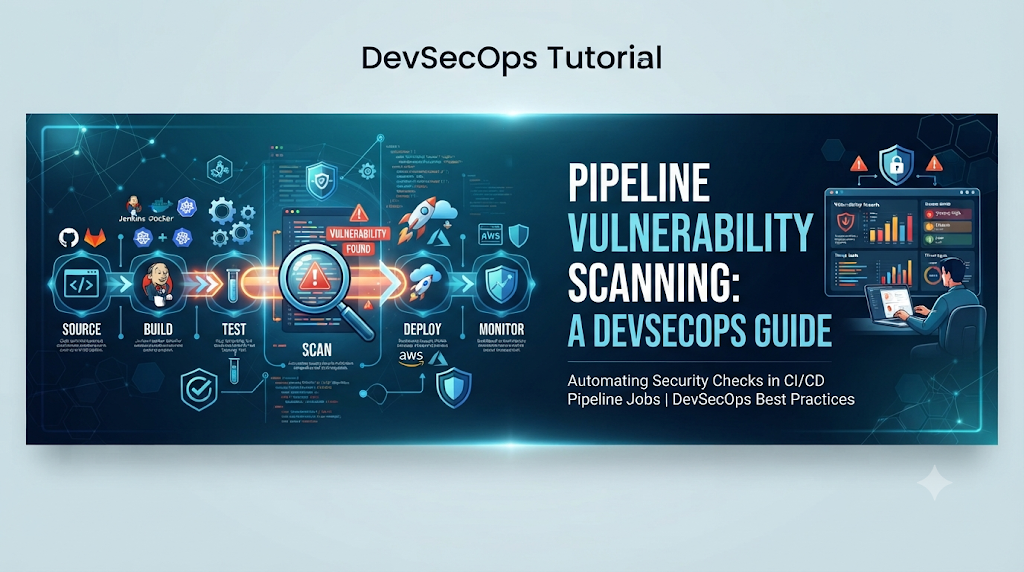
An effective CI/CD security pipeline sequences validation checks logically, running fast checks first and heavier analyses later to provide rapid feedback to developers while maintaining strict quality gates.
[Source Checkout]
       │
       ▼
[Secret Scanning] ──(Fail)──> [Block Pipeline]
       │
       ▼
[SAST & Code Validation] ──(Fail)──> [Block Pipeline]
       │
       ▼
[Dependency Scanning (SCA)] ──(Fail)──> [Block Pipeline]
       │
       ▼
[Unit & Integration Tests]
       │
       ▼
[Container Image Build]
       │
       ▼
[Container Image Scanning] ──(Fail)──> [Block Pipeline]
       │
       ▼
[IaC Configuration Scanning]
       │
       ▼
[Deployment Approval & Release]
Pipeline Stage Breakdown
- Source Checkout: Fetches the repository code for the current commit or pull request.
- Secret Scanning: Rapidly scans files for exposed passwords, tokens, and private keys.
- Code Validation & Linting: Ensures syntax correctness and basic formatting standards.
- SAST Analysis: Evaluates application source code for deep logical vulnerabilities.
- Dependency Scanning (SCA): Checks third-party libraries against vulnerability feeds.
- Unit and Integration Tests: Validates functional application correctness.
- Container Image Building: Packages the verified application into a Docker container image.
- Container Image Scanning: Inspects the freshly built image layers for OS and runtime vulnerabilities.
- Infrastructure Configuration Scanning: Validates Terraform or Kubernetes deployment definitions.
- Deployment Approval: Evaluates all scan reports against organizational security quality gates.
- Post-Deployment Security Validation: Runs light smoke tests or dynamic checks in staging.
If critical security checks fail in any blocking stage, the pipeline halts immediately, preventing insecure artifacts from progressing further.
6. Integrate Vulnerability Scanners Into Pipeline Jobs
Integrating security tools into CI/CD platforms involves configuring runner environments, installing scanner binaries or container actions, passing execution arguments, and capturing exit codes. Below are practical configuration examples across different scanning domains.
Source Code and Secret Scanning Job
To prevent secrets from leaking into repositories, a pipeline job can execute a dedicated secret scanner such as TruffHog or Gitleaks during early build stages.
YAML
stages:
  - security

secret_scan:
  stage: security
  image: alpine:latest
  before_script:
    - apk add --no-cache git gitleaks
  script:
    - gitleaks detect --source . --verbose --exit-code 1
  allow_failure: false
Static Application Security Testing (SAST) Job
Using a popular SAST tool like Semgrep, developers can scan source code for insecure patterns using custom or community rule sets.
YAML
sast_scan:
  stage: security
  image: returntocorp/semgrep:latest
  script:
    - semgrep ci --config auto
  artifacts:
    when: always
    reports:
      sast: semgrep-report.json
Software Composition Analysis (SCA) Job
For Node.js or Python projects, dependency scanning checks package manifests (package.json or requirements.txt) for vulnerable dependencies.
YAML
dependency_scan:
  stage: security
  image: node:18-alpine
  script:
    - npm install
    - npm audit --audit-level=high
  allow_failure: false
Container Image Vulnerability Scanning Job
Once a Docker image is built, a scanner like Trivy can inspect the image for operating system and application package vulnerabilities.
YAML
container_scan:
  stage: security
  image:
    name: aquasec/trivy:latest
    entrypoint: [""]
  script:
    - trivy image --exit-code 1 --severity CRITICAL,HIGH my-app:latest
Infrastructure as Code (IaC) Scanning Job
To validate Terraform configurations, tools like Checkov scan infrastructure code for cloud misconfigurations.
YAML
iac_scan:
  stage: security
  image: bridgecrew/checkov:latest
  script:
    - checkov -d ./terraform --output json --output-file checkov-report.json
  artifacts:
    paths:
      - checkov-report.json
Each scanner returns specific exit codes. Non-zero exit codes signal that vulnerabilities meeting the threshold were detected, allowing the pipeline orchestrator to fail the job and block deployment.
7. Configure Security Quality Gates
A security quality gate is a set of defined criteria that determines whether a build passes or fails based on security scan results. Treating every vulnerability with equal severity creates alert fatigue and paralyzes delivery pipelines. Quality gates must be configured intelligently.
Evaluating Severity Levels
Vulnerability scoring frameworks (such as CVSS) categorize findings into four primary severity levels:
- Critical: Immediate exploitability with severe business impact (e.g., unauthenticated remote code execution).
- High: Significant risk requiring urgent remediation (e.g., privilege escalation or SQL injection).
- Medium: Moderate risk requiring planned remediation (e.g., information disclosure).
- Low: Minor risk with minimal direct impact (e.g., low-risk version mismatch).
Factors Influencing Quality Gates
When designing pipeline blocking rules, consider:
- Vulnerability Exploitability: Is there a public exploit available? Is the vulnerable function actually called by the application?
- Available Fixes: Is an updated patch or patched library version available?
- Application Exposure: Is the service internal-facing or exposed directly to the public internet?
- Business Impact: What is the criticality of the data processed by the application?
Practical Quality Gate Example
A sensible production quality gate might enforce the following rule:
- Critical Vulnerabilities: Zero tolerance. Any critical finding blocks the pipeline immediately.
- High Vulnerabilities: Allowed only if accompanied by a documented, time-bound risk exception.
- Medium and Low Vulnerabilities: Flagged in reports and tracked for future sprints, but do not block the pipeline.
YAML
# Example quality gate evaluation script snippet
trivy image --exit-code 1 --severity CRITICAL my-app:latest
If Trivy detects even one critical vulnerability, it exits with status 1, immediately halting the pipeline.
8. Manage Scan Reports and Security Findings
Generating security reports is only valuable if developers, security engineers, and engineering managers can review, track, and act upon the data efficiently.
Machine-Readable vs. Human-Readable Reports
- Machine-Readable Reports (JSON, SARIF, XML): Essential for ingestion by CI/CD platforms, security dashboards, and vulnerability management systems. SARIF (Static Analysis Results Interchange Format) has become a universal standard for integrating security results into pull requests.
- Human-Readable Reports (HTML, Console Output): Helpful for developers reviewing pipeline failure logs directly in the CI/CD console or markdown summaries attached to pull requests.
Pipeline Artifacts and Security Dashboards
Store scan reports as pipeline artifacts so engineering teams can download and audit them. Centralized security dashboards aggregate findings across multiple repositories, providing visibility into overall organizational security posture.
Merge Request and Pull Request Feedback
Integrate scanner findings directly into code review interfaces. When a developer opens a pull request, inline comments highlight security regressions, allowing them to fix issues before merging code into the main branch.
Vulnerability Ownership and Tracking
Assign clear ownership for every finding. Developers own application code and dependencies, infrastructure teams own IaC and cloud configurations, and security teams oversee policy and exception management. Linking scan findings to issue-tracking systems (such as Jira or GitHub Issues) ensures accountability.
9. Handle False Positives and Reduce Scanning Noise
Automated security scanners analyze code statically or examine package versions without runtime context. Consequently, they occasionally report false positives—findings that appear vulnerable in theory but are not exploitable in practice.
Validating Scanner Findings
When a scanner flags an issue, developers and security engineers must investigate its validity:
- Check Dependency Usage: Is the vulnerable function imported and executed, or is it merely sitting in an unused dependency tree?
- Review Code Paths: Does user input actually reach the vulnerable code path?
- Examine Environment Controls: Are compensating controls (such as web application firewalls or network segmentation) mitigating the risk?
Approved Suppression Rules and Exceptions
When a finding is verified as a true false positive or an accepted risk, teams should manage it systematically rather than ignoring the alert:
- Suppression Files: Use scanner-specific configuration files (such as
.trivyignoreor Semgrep ignore annotations) to document why a finding is suppressed. - Documented Exceptions: Record the business justification, compensating controls, and expiration date for any accepted risk.
- Expiration Dates: Never allow permanent exceptions. Every risk acceptance must expire after a set timeframe (e.g., 90 days) to force re-evaluation.
Reducing noise prevents alert fatigue, ensuring developers take pipeline security warnings seriously.
10. Practical Project: Build an Automated Vulnerability Scanning Workflow
To solidify these concepts, let us walk through building a complete automated vulnerability scanning workflow for a sample web application (my-sample-web-app).
Step 1: Prepare the Sample Repository
Our repository contains a simple Node.js web application with a package.json file, a Dockerfile, and a Terraform directory defining a cloud storage bucket.
Step 2: Define Security Scanning Requirements
Our pipeline must execute:
- Secret detection (
gitleaks) - Static code analysis (
semgrep) - Dependency auditing (
npm audit) - Container image scanning (
trivy) - Infrastructure configuration checking (
checkov)
Step 3: Configure the CI/CD Pipeline
Below is a complete, multi-stage CI/CD pipeline configuration file (.gitlab-ci.yml or adapted for GitHub Actions) demonstrating all security stages.
YAML
stages:
  - scan-secrets
  - scan-code
  - scan-dependencies
  - build-container
  - scan-container
  - scan-iac
  - deploy

variables:
  IMAGE_NAME: "my-sample-web-app"
  IMAGE_TAG: "$CI_COMMIT_SHA"

secret_scanning:
  stage: scan-secrets
  image: gitleaks/gitleaks:latest
  script:
    - gitleaks detect --source . --verbose --exit-code 1

sast_analysis:
  stage: scan-code
  image: returntocorp/semgrep:latest
  script:
    - semgrep ci --config auto

dependency_scan:
  stage: scan-dependencies
  image: node:18-alpine
  script:
    - npm install
    - npm audit --audit-level=high

build_container:
  stage: build-container
  image: docker:latest
  services:
    - docker:dind
  script:
    - docker build -t $IMAGE_NAME:$IMAGE_TAG .

container_security_scan:
  stage: scan-container
  image:
    name: aquasec/trivy:latest
    entrypoint: [""]
  script:
    - trivy image --exit-code 1 --severity CRITICAL $IMAGE_NAME:$IMAGE_TAG

iac_security_scan:
  stage: scan-iac
  image: bridgecrew/checkov:latest
  script:
    - checkov -d ./terraform

deploy_production:
  stage: deploy
  image: alpine:latest
  script:
    - echo "All security gates passed. Deploying to production..."
Step 4: Testing and Remediation
- Trigger a Test Run: Commit a vulnerable dependency version intentionally into
package.jsonin a test branch. - Observe Pipeline Failure: The
dependency_scanstage fails, halting the pipeline and outputting the specific CVE identifier. - Apply Remediation: Update
package.jsonto the patched dependency version. - Verify Improvement: Push the fix. The pipeline successfully passes all security gates, builds the container image, and proceeds to deployment.
11. Integrate Vulnerability Scanning With Developer Workflows
Security scanning in CI/CD is powerful, but waiting for a pipeline run to discover an issue can disrupt developer velocity. The most effective DevSecOps programs push security feedback as close to the developer’s workstation as possible.
Pre-commit Hooks
Using tools like pre-commit, developers can run lightweight secret scanning and syntax checks locally before code can even be committed to local Git history.
IDE-Based Security Checks
Integrating security plugins directly into Integrated Development Environments (IDEs) like VS Code or IntelliJ allows developers to see security linting errors and vulnerable library warnings as they write code.
Merge Request and Pull Request Feedback
When code is pushed, pipeline results should appear directly inside the pull request interface. Clear inline comments explain what went wrong and how to fix it, turning security reviews into collaborative learning opportunities.
Security Ownership and Collaboration
Clear ownership models ensure developers understand how to fix code and dependency vulnerabilities, while security teams focus on overarching policy, threat modeling, and complex exception reviews.
12. Keep Scanning Efficient Without Slowing Down Delivery
A common criticism of pipeline security is that comprehensive scanning makes builds unbearably slow. Teams can maintain rigorous security coverage without sacrificing speed by applying optimization strategies.
Parallel Scanning Jobs
Instead of running scanners sequentially, execute independent checks in parallel. Secret scanning, SAST, SCA, and IaC checks can all run simultaneously in separate pipeline jobs.
Dependency and Scanner Caching
Cache downloaded scanner vulnerability databases, package manager caches (node_modules, pip cache), and tool binaries across pipeline runs to minimize network overhead and startup time.
Incremental Scanning
Where supported by tools, utilize incremental or differential scanning so that scanners only analyze modified files and newly added code rather than re-scanning entire codebases on every minor commit.
Reusable Pipeline Templates
Standardize security scanning jobs into modular, reusable CI/CD templates or actions. This ensures consistent security guardrails across dozens of microservices without duplicating configuration code.
Separating Fast Checks from Deep Scans
Run fast checks (secrets, basic SAST, dependency audits) on every single commit and pull request. Schedule deeper, resource-intensive DAST or comprehensive vulnerability audits to run nightly or weekly on main branch builds.
13. Common Problems in Automated Vulnerability Scanning
Implementing automated vulnerability scanning often comes with practical hurdles. Here is how to diagnose and resolve common issues:
- Scanner Installation Failures: Often caused by missing base dependencies or outdated runner OS images. Ensure runner environments include required runtime libraries or use official containerized scanner actions.
- Incorrect Scanner Configuration: Misconfigured ignore paths or incorrect rule sets lead to missed vulnerabilities or overwhelming false positives. Validate configuration files locally before committing.
- Missing Authentication for Private Registries: Container scanners attempting to pull base images from private registries fail without configured credentials. Securely inject registry tokens into pipeline environment variables.
- Outdated Vulnerability Databases: Scanners rely on local or cloud vulnerability feeds. If databases fail to update, newly discovered CVEs go undetected. Configure automatic database updates at the start of scanning jobs.
- Large Report Files: Excessive findings can bloat pipeline artifacts and overwhelm developers. Configure severity thresholds and output formats to focus on actionable findings.
- Pipeline Failures Caused by Scanner Timeouts: Network-heavy dependency checks or large container scans can timeout. Adjust pipeline timeout limits and cache vulnerability databases locally.
14. Build a Continuous Vulnerability Remediation Process
Finding vulnerabilities in a pipeline is only the first step. Without a structured remediation process, scan reports pile up, ignored warnings accumulate, and application security degrades over time.
Assigning Ownership and SLAs
Define clear Service Level Agreements (SLAs) for remediation based on severity. For example, critical vulnerabilities must be patched within 48 hours, high severity within 14 days, and medium severity within 30 days.
Updating Vulnerable Dependencies and Rebuilding Images
Establish automated dependency update tools (such as Dependabot or Renovate) to automatically open pull requests when library patches are released. Ensure that updating a base library automatically triggers container image rebuilding and re-scanning.
Tracking Unresolved Findings and Exceptions
Maintain a centralized view of open security findings across all repositories. Track exception requests, review expiring risk acceptances regularly, and analyze recurring vulnerability patterns to address root causes in organizational coding standards.
15. Final Thoughts: Make Security Scanning a Normal Pipeline Activity
Automated vulnerability scanning transforms application security from an unpredictable final hurdle into a seamless, continuous part of software delivery. By shifting security left, engineering teams catch code flaws, vulnerable dependencies, insecure container images, and misconfigured infrastructure before they ever reach production. Effective security automation requires the right combination of specialized scanners, sensible quality gates that avoid alert fatigue, actionable reports, and close collaboration between developers and security professionals. When vulnerability scanning becomes a normal, automated pipeline activity, organizations achieve both rapid delivery and robust, resilient software security.