






Imagine a development team writing code daily yet struggling to release features because testing, approvals, and packaging rely on slow manual processes. Continuous Delivery (CD) solves this by ensuring your software is always in a validated, deployable state. Every successful pipeline run produces a reliable release candidate ready for safe production deployment whenever the business demands it. For professionals looking to build these vital competencies, DevOpsSchool provides practical educational resources for developing modern DevOps and CI/CD skills.
1. Understand the Continuous Delivery Model
To implement Continuous Delivery successfully, teams must first establish a clear understanding of what the model entails, how it differs from traditional methods, and how it fits into the broader ecosystem of software engineering practices.
What Continuous Delivery Means
Continuous Delivery is a software engineering approach where teams produce software in short cycles, ensuring that the software can be reliably released at any time. The primary objective is to make releases boring, routine, and low-risk. By automating the build, test, and verification stages, teams eliminate manual toil and reduce lead time—the duration it takes for a code commit to reach production.
Continuous Integration vs. Continuous Delivery vs. Continuous Deployment
These terms are often used interchangeably, but they represent distinct phases and scopes within the modern release lifecycle:
- Continuous Integration (CI): The practice where developers frequently merge their code changes into a central repository, typically multiple times a day. Each merge triggers an automated build and runs unit tests to detect integration errors early.
- Continuous Delivery (CD): An extension of CI that automates the entire software release process up to the point of production. Every code change that passes automated validation is packaged into a release candidate. However, the final deployment to production is triggered by a deliberate human decision or business approval.
- Continuous Deployment: A further evolution where every change that passes all stages of the automated pipeline is deployed directly to production without human intervention. While powerful, this requires an exceptionally high degree of test coverage and automated confidence monitoring.
| Practice | Scope | Production Release Trigger | Primary Objective |
| Continuous Integration | Code merging and initial build verification | N/A (Build/Test only) | Catch integration errors quickly |
| Continuous Delivery | Build, test, security, packaging, and staging | Manual approval / Business decision | Keep software always deployable |
| Continuous Deployment | Full pipeline including automated production push | Fully automated (No human gate) | Eliminate release friction entirely |
The Role of Automation in Software Delivery
Automation forms the backbone of Continuous Delivery. Manual processes are inherently slow, error-prone, and difficult to audit. By automating repetitive tasks—such as compiling code, running test suites, scanning for vulnerabilities, packaging artifacts, and provisioning staging environments—organizations ensure repeatability and consistency across every release cycle.
Why Keeping Software Release-Ready Matters
When software is always ready for release, teams gain unprecedented business agility. Features reach users faster, customer feedback loops shorten, and emergency hotfixes become ordinary patch deployments rather than corporate crises. Furthermore, small, frequent releases drastically lower the blast radius if an issue occurs, making troubleshooting straightforward.
2. Assess Your Current Software Delivery Process
Before writing a single line of pipeline configuration, teams must perform an honest assessment of their existing software delivery workflow. Attempting to automate a broken or poorly understood process will only accelerate failure.
Evaluating Workflow Components
Examine each stage of the current release lifecycle:
- Source Code Management: How are branches managed? Are developers committing frequently to main, or are long-lived feature branches causing painful merge conflicts?
- Build and Packaging Processes: Are builds executed locally on developer laptops, or is there a centralized, repeatable build server?
- Manual Testing Activities: How much time is spent on manual QA, exploratory testing, and regression verification?
- Environment Management: Are staging and development environments identical to production, or do “it works on my machine” discrepancies plague the team?
- Deployment Procedures: Are deployments executed via manual shell scripts, runbooks, or GUI clicks?
- Approval Requirements: What governance and compliance checks must occur before a release?
Identifying Bottlenecks and Waste
Look for common delivery anti-patterns:
- Repetitive Manual Tasks: Copying binaries, editing configuration files by hand, or manually updating databases.
- Unreliable Handoffs: Code thrown “over the wall” from development to QA, resulting in misaligned expectations.
- Slow Feedback Loops: Unit tests that take hours to run or nightly builds that fail silently.
- Environment Inconsistencies: Bugs that appear only in production due to configuration drift.
Illustrative Assessment Example
Consider an e-commerce application team mapping their workflow:
- Code Commit: Developers merge code into
mainweekly. - Build: A developer manually triggers a Maven build on a shared virtual machine.
- Testing: QA engineers execute a 3-day manual test script.
- Staging: Operations deploys the artifact using an undocumented shell script.
- Approval: Management signs off via email thread.
- Production: Scheduled monthly midnight deployment window with a high rollback rate.
Identified Improvements: Replace manual Maven builds with automated CI triggers; introduce automated unit and integration test suites to replace 80% of manual regression testing; adopt Infrastructure as Code (IaC) to standardize staging and production environments.
3. Design the Continuous Delivery Pipeline Architecture
A robust Continuous Delivery Pipeline is structured as a series of automated gates and stages that transform source code into a verified release candidate.
Core Pipeline Components
- Version Control Repository: Stores application source code, configuration files, and pipeline definitions (e.g., Git).
- CI/CD Orchestration Platform: Executes pipeline workflows, manages triggers, and coordinates stages (e.g., Jenkins, GitLab CI, GitHub Actions, Tekton).
- Build Environment: Isolated execution nodes or containers where compilation and packaging occur.
- Automated Testing Framework: Executes unit, integration, API, and end-to-end tests.
- Artifact Repository: Stores versioned, immutable build outputs (e.g., Docker registries, Nexus, Artifactory).
- Configuration Management: Separates environment-specific settings from application binaries.
- Deployment Automation Tools: Provisions infrastructure and pushes artifacts to target environments.
- Monitoring and Notification Systems: Tracks pipeline health, execution duration, and deployment telemetry.
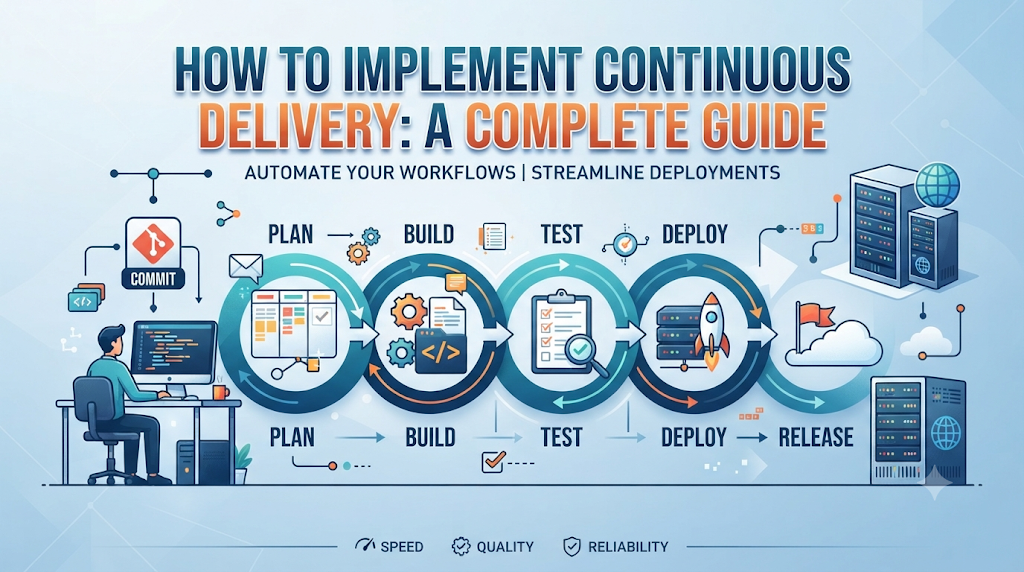
The Pipeline Flow: From Commit to Release Candidate
- Commit Stage: A developer pushes code changes to the repository. The CI/CD platform detects the webhook event and triggers the pipeline.
- Build and Unit Test Stage: Code is compiled, dependencies are resolved, and unit tests execute rapidly to validate core logic.
- Quality and Security Stage: Static code analysis and dependency vulnerability scans inspect the codebase.
- Artifact Creation Stage: A successful build is packaged into a versioned artifact (such as a container image or JAR file) and pushed to the artifact repository.
- Staging Deployment Stage: The artifact is deployed automatically to a staging environment that mirrors production.
- Acceptance Testing Stage: Automated integration and smoke tests run against the staging deployment.
- Release Candidate Readiness: Upon successful completion, the pipeline pauses, presenting the validated artifact as a production-ready release candidate awaiting approval.
4. Prepare the Foundation Before Automating Releases
Automating an unstable delivery process amplifies chaos. Before building pipelines, organizations must establish solid technical foundations.
Prerequisites for Success
- Reliable Version Control Workflow: Adopt trunk-based development or structured pull-request workflows with mandatory code reviews.
- Consistent Build Instructions: Ensure builds are deterministic and executable via a single command line instruction, independent of developer workstation configuration.
- Automated Unit and Integration Tests: Maintain a healthy test suite that provides fast feedback on code correctness.
- Repeatable Environment Provisioning: Treat infrastructure as code using tools like Terraform or OpenTofu so environments can be created and destroyed reliably.
- Versioned Application Artifacts: Never deploy raw source code or unversioned binaries to downstream environments.
- Configuration Separation: Externalize configuration (database URLs, feature flags, API keys) from application code using environment variables or dedicated secret stores.
- Secure Credentials Management: Eliminate hardcoded passwords and API tokens by integrating secret managers (e.g., HashiCorp Vault, cloud secret services).
5. Build Your First Continuous Delivery Pipeline
To demonstrate a practical implementation, let us walk through building a Continuous Delivery pipeline for a sample Node.js REST API application (order-api).
The Sample Application Lifecycle
Our pipeline will execute across eight distinct stages, progressing code safely from commit to production readiness.
Stage A: Source Code Integration
The pipeline triggers automatically whenever code is pushed to the main branch.
YAML
# Example pipeline configuration snippet (GitHub Actions format)
name: Order API CD Pipeline

on:
  push:
    branches: [ "main" ]

jobs:
  build-and-test:
    runs-on: ubuntu-latest
    steps:
      - name: Checkout Source Code
        uses: actions/checkout@v4

      - name: Setup Node.js Environment
        uses: actions/setup-node@v4
        with:
          node-version: '20'
          cache: 'npm'
Stage B: Automated Build
Dependencies are installed and application assets are prepared.
YAML
      - name: Install Dependencies
        run: npm ci

      - name: Run Linting Checks
        run: npm run lint
Stage C: Automated Testing
Unit and integration tests run to verify software behavior.
YAML
      - name: Execute Unit Tests
        run: npm test -- --coverage
Stage D: Security and Quality Validation
Static application security testing (SAST) and dependency vulnerability scans check for security flaws.
YAML
      - name: Scan Dependencies for Vulnerabilities
        run: npm audit --audit-level=high
Stage E: Artifact Creation
A versioned container image is built, tagged with the Git commit SHA, and pushed to an artifact registry.
YAML
      - name: Build and Push Container Artifact
        env:
          REGISTRY: ghcr.io
          IMAGE_NAME: organization/order-api
        run: |
          echo "${{ secrets.GITHUB_TOKEN }}" | docker login ghcr.io -u $GITHUB_ACTOR --password-stdin
          IMAGE_TAG="${REGISTRY}/${IMAGE_NAME}:${GITHUB_SHA}"
          docker build -t $IMAGE_TAG .
          docker push $IMAGE_TAG
Stage F: Staging Deployment
The newly created artifact is deployed to the staging environment using Infrastructure as Code and deployment scripts.
YAML
  deploy-to-staging:
    needs: build-and-test
    runs-on: ubuntu-latest
    environment: staging
    steps:
      - name: Deploy to Staging Environment
        run: |
          echo "Deploying image ghcr.io/organization/order-api:${{ github.sha }} to Staging K8s Cluster"
          # kubectl set image deployment/order-api order-api=ghcr.io/organization/order-api:${{ github.sha }}
Stage G: Release Validation
Automated smoke tests and health checks verify the staging deployment.
YAML
      - name: Run Smoke Tests against Staging
        run: |
          curl --fail https://staging-api.example.com/health || exit 1
Stage H: Production Readiness
The pipeline pauses at a manual approval gate. Once authorized by authorized personnel, the exact same artifact deployed in staging is promoted to production.
YAML
  deploy-to-production:
    needs: deploy-to-staging
    runs-on: ubuntu-latest
    environment: production # Requires manual approval in GitHub Environments
    steps:
      - name: Deploy to Production Environment
        run: |
          echo "Promoting image ghcr.io/organization/order-api:${{ github.sha }} to Production"
          # kubectl set image deployment/order-api order-api=ghcr.io/organization/order-api:${{ github.sha }}
6. Automate Testing Without Slowing Down Delivery
A pipeline is only as reliable as its test suite. If tests are slow, flaky, or incomplete, trust in the delivery process erodes.
Test Pyramid and Pipeline Placement
Effective test automation follows the test pyramid principle:
- Unit Tests: Execute extremely fast (milliseconds) and validate individual functions or classes. Run these on every commit.
- Integration Tests: Verify interactions between modules, databases, and external APIs. Run after successful unit tests.
- API and Contract Tests: Ensure backend services adhere to expected interface contracts.
- End-to-End (E2E) and UI Tests: Simulate user journeys through the entire application stack. Because these are slower and more prone to flakiness, run a targeted subset in staging rather than clogging the early pipeline stages.
- Performance and Security Tests: Run asynchronously or scheduled nightly to catch memory leaks, throughput limits, and vulnerability regressions.
Managing Test Reliability
- Eliminate Flaky Tests: Isolate or rewrite tests that fail intermittently due to race conditions, network latency, or shared database state.
- Parallel Execution: Distribute test suites across multiple pipeline runner nodes to keep feedback loops under 5 to 10 minutes.
- Test Data Management: Provision ephemeral, isolated test databases for each pipeline execution to prevent test interference.
7. Manage Build Artifacts and Environment Consistency
A fundamental tenet of Continuous Delivery is that you build your application once and promote that exact artifact across all subsequent environments. Rebuilding code for staging or production introduces subtle compilation differences and invalidates testing guarantees.
Best Practices for Artifact Management
- Artifact Versioning: Use semantic versioning combined with immutable build identifiers (such as Git commit hashes or build numbers).
- Artifact Repositories: Store binaries in secure, centralized repositories (Docker registries, Nexus, Artifactory, AWS ECR) rather than local pipeline workspace folders.
- Checksum Verification: Generate and verify cryptographic checksums to ensure artifacts remain tamper-proof during transport.
- Environment-Specific Configuration: Keep application binaries strictly environment-agnostic. Inject configuration values (database endpoints, log levels) at runtime using environment variables or configuration maps.
- Retention and Cleanup Policies: Implement lifecycle policies to archive old release candidates while maintaining compliance audit trails.
8. Add Deployment Automation and Release Controls
Automating deployment removes human error from repetitive server operations while retaining necessary governance over production changes.
Key Enablers of Deployment Automation
- Infrastructure as Code (IaC): Define servers, networking, and clusters in declarative code (Terraform, Ansible, CloudFormation) so environments are reproducible.
- Deployment Scripts and Workflows: Standardize deployment procedures into repeatable, parameterized scripts or Helm charts.
- Environment-Specific Permissions: Restrict production deployment credentials strictly to automated service accounts and authorized release managers.
- Manual Approval Gates: Implement human-in-the-loop checkpoints for production promotion to comply with regulatory and business requirements.
- Scheduled Releases and Maintenance Windows: Combine CD pipelines with business calendars to restrict high-impact deployments to appropriate operational windows.
- Rollback Readiness: Ensure every automated deployment script includes a tested rollback mechanism that can revert to the previous stable artifact instantly.
9. Choose a Safe Release Strategy
Deploying code to production does not mean exposing it to all users instantly. Modern release engineering employs advanced deployment strategies to minimize production risk.
Overview of Deployment Strategies
| Strategy | Workflow Overview | Best Use Cases | Advantages | Limitations |
| Rolling Deployment | Instances in a cluster are updated incrementally in small batches. | Stateless web applications, microservices | Zero downtime; no extra infrastructure required | Slower rollout; mixed version states during deployment |
| Blue-Green Deployment | Two identical production environments (Blue and Green). Traffic switches instantly via router/load balancer. | Mission-critical applications requiring instant cutover | Instant rollback; clean environment isolation | Requires double the infrastructure resources |
| Canary Release | New version deployed to a tiny subset of users (e.g., 5%). Monitored closely before scaling to 100%. | High-traffic services, user-facing APIs | Limits blast radius; real-world production validation | Complex routing and metrics observability required |
| Feature Flags | Code deployed to production dormant; functionality toggled on remotely for specific users. | Gradual feature rollouts, A/B testing | Decouples deployment from feature release | Code complexity; technical debt from stale flags |
10. Secure the Continuous Delivery Process (DevSecOps)
Security must be woven into every stage of the delivery pipeline rather than treated as a final gatekeeper before production.
Key Security Practices
- Least-Privilege Access: Grant CI/CD runners and deployment service accounts only the minimum necessary permissions to perform their tasks.
- Secrets Protection: Store database passwords, signing keys, and API tokens in enterprise secret managers. Never log secrets or commit them to version control.
- Secure Build Agents: Ephemeral, disposable build containers prevent compromised build agents from persisting malicious modifications.
- Dependency and Container Scanning: Automatically check open-source libraries and base container images for known Common Vulnerabilities and Exposures (CVEs).
- Artifact Signing: Digitally sign container images or binaries (e.g., using Cosign) to verify provenance and integrity before deployment.
- Audit Logging: Maintain immutable audit trails recording who triggered a pipeline, what tests passed, and who approved production deployment.
11. Monitor Releases and Handle Delivery Failures
Even with rigorous automated testing, anomalies can occur in production. A complete CD pipeline encompasses observability and incident response readiness.
Monitoring Post-Deployment Health
Teams should continuously track key telemetry signals following a deployment:
- Application logs and error rates (HTTP 5xx spikes).
- Service latency and response time distributions.
- Resource utilization (CPU, memory, disk I/O).
- Business transaction success rates.
Handling Pipeline and Deployment Failures
- Pipeline Failures: When a build, test, or security scan fails, the pipeline halts immediately, notifying the offending developer via chat or email. No broken artifact proceeds downstream.
- Deployment Failures: If automated health checks fail post-deployment, the orchestration platform should trigger an automated rollback to the previous known-good artifact version.
- Database Compatibility: Ensure database migrations are backward-compatible (e.g., expanding database schemas before writing new code) to prevent rollback failures.
12. Measure the Effectiveness of Continuous Delivery
To ensure continuous improvement, organizations must measure delivery performance using industry-standard metrics.
Key Metrics to Track
- Deployment Frequency: How often successfully tested code is released to production.
- Lead Time for Changes: The total duration from a developer’s first commit to code running successfully in production.
- Change Failure Rate: The percentage of production deployments that result in degraded service, incidents, or immediate hotfixes.
- Mean Time to Restore Service (MTTR): How long it takes an organization to recover from a production failure.
- Pipeline Execution Duration: Total time required for the pipeline to build, test, and package an artifact.
- Build Success Rate: Percentage of pipeline runs that pass all quality gates without failure.
13. A 30-Day Continuous Delivery Adoption Roadmap
Implementing Continuous Delivery is an incremental journey. Organizations can follow this practical 30-day adoption roadmap to build momentum safely.
Week 1 – Assess
- Map the current software delivery workflow from commit to production.
- Identify primary bottlenecks, manual handoffs, and environment inconsistencies.
- Establish baseline measurements for deployment frequency and lead time.
Week 2 – Automate
- Standardize version control workflows and establish trunk-based development practices.
- Implement automated CI builds and fast unit test execution on every commit.
- Set up a centralized artifact repository.
Week 3 – Validate
- Introduce automated integration testing and security vulnerability scanning into the pipeline.
- Provision a staging environment that mirrors production using Infrastructure as Code.
- Configure automated staging deployments and smoke tests.
Week 4 – Improve
- Implement controlled production deployment gates and manual approval workflows.
- Integrate application monitoring, error tracking, and automated rollback scripts.
- Review metrics performance and plan iterative refinements.
Conclusion: Make Every Change Ready for Delivery
Continuous Delivery transforms software engineering from a chaotic, high-stress ordeal into a disciplined, repeatable engineering discipline. By connecting source control, automated testing, security checks, artifact management, deployment automation, and monitoring into a cohesive pipeline, organizations ensure that software is always in a release-ready state. Successful implementation relies not just on tooling, but on stable automation, rigorous testing discipline, consistent environments, and a culture of continuous learning and improvement. For professionals seeking to deepen their expertise in these practices, educational platforms like DevOpsSchool offer comprehensive learning pathways in DevOps and CI/CD engineering. Ultimately, Continuous Delivery is about making every change predictable, validated, and ready for safe delivery whenever the business requires it.