




Introduction
In the modern era of software engineering, the speed at which a team can ship code is often a direct indicator of its competitive advantage. However, speed without stability is a recipe for technical debt and operational burnout. This is where the DevOps lifecycle becomes essential. It is not just a methodology or a set of tools; it is a cultural and technical framework that unifies development and operations to shorten the systems development life cycle while delivering features, fixes, and updates frequently in close alignment with business objectives.
Cloud-native applications have made the landscape more complex. With microservices, distributed systems, and immutable infrastructure, manual deployment processes are no longer sustainable. Automation is the backbone of this evolution. By understanding the DevOps lifecycle, engineering teams can build robust, repeatable, and scalable systems.
If you are looking to master these concepts through practical, hands-on learning, resources provided by DevOpsSchool offer deep dives into the methodologies and toolchains that power this lifecycle. Whether you are a developer looking to understand how your code travels to production, or an operator building the platforms that enable that transit, this guide provides the blueprint for modern software delivery.
What Is the DevOps Lifecycle?
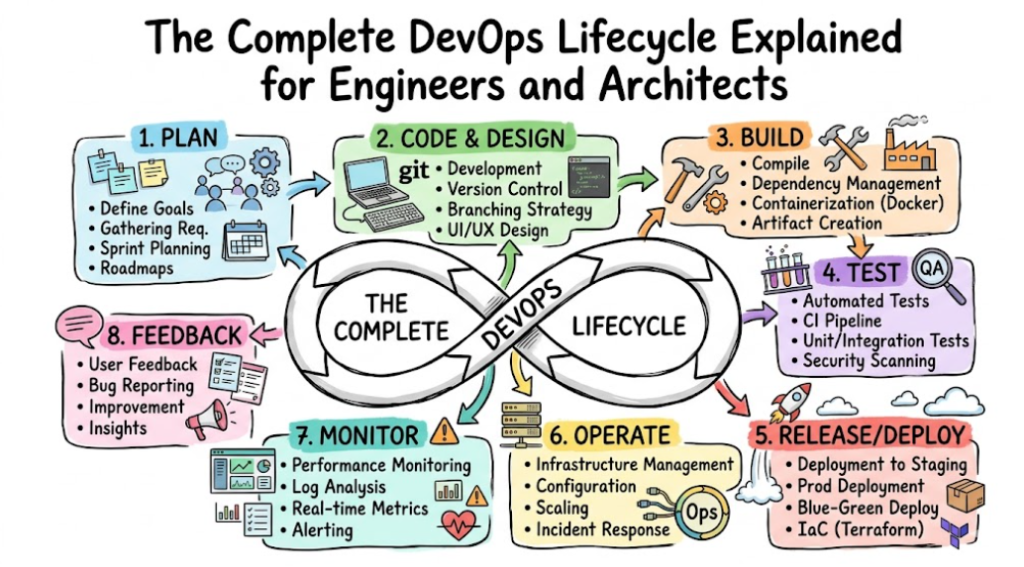
The DevOps lifecycle is a continuous, iterative process designed to bridge the gap between software development (Dev) and IT operations (Ops). It represents the entire journey of software, from the initial idea or requirements gathering to deployment, operation, and continuous feedback.
It is defined by a continuous loop of development, testing, integration, deployment, and monitoring. In a mature DevOps environment, this lifecycle is fully automated. When a developer pushes code, it triggers a chain of events—automated builds, security scans, unit tests, and eventually deployment to a production environment—without manual intervention. This culture of shared responsibility means that developers are as concerned with production stability as operations engineers are with the speed of code delivery.
Why the DevOps Lifecycle Matters
The shift toward a DevOps lifecycle is driven by the need for business agility and reliability. Here is why organizations adopt this model:
- Faster Releases: By automating the pipeline, teams can move from code commit to deployment in minutes rather than weeks.
- Deployment Reliability: Automated testing and infrastructure provisioning ensure that the environment is consistent, reducing the “it works on my machine” problem.
- Reduced Downtime: Through CI/CD and automated rollback strategies, updates are smaller and safer, allowing for quicker recovery if issues occur.
- Improved Collaboration: DevOps breaks down silos. Developers and operators share the same tools and goals, leading to better communication and faster incident resolution.
- Continuous Improvement: The feedback loop allows teams to learn from performance data in production, feeding those insights back into the planning stage.
Evolution of the DevOps Lifecycle
The industry did not jump straight to DevOps. It evolved through necessity.
- Waterfall Limitations: Traditional delivery relied on sequential stages where development finished before operations began. This created massive bottlenecks, and “throwing code over the wall” often led to failed deployments.
- Agile Transformation: Agile introduced iterative development, improving the speed of code writing, but it did not solve the deployment friction between dev and ops.
- Rise of CI/CD: As cloud computing emerged, the need for automated pipelines grew. This led to the creation of CI/CD (Continuous Integration and Continuous Deployment) as the operational implementation of DevOps.
- Cloud-Native Evolution: Today, with containers and Kubernetes, the DevOps lifecycle is focused on ephemeral environments, where the infrastructure itself is code and can be scaled on demand.
Overview of the DevOps Lifecycle Stages
| Stage | Purpose | Key Activities | Common Tools |
| Planning | Definition | Backlog, Sprints, Strategy | Jira, Trello |
| Development | Writing | Coding, Versioning | Git, GitHub |
| Build | Compilation | Dependencies, Packaging | Maven, Gradle |
| Testing | Validation | Unit/Security Testing | Selenium, SonarQube |
| Release | Management | Artifact Storage | Nexus, Artifactory |
| Deployment | Rollout | Orchestration | K8s, Argo CD |
| Operations | Stability | Infrastructure Management | Terraform, Ansible |
| Monitoring | Visibility | Logging, Metrics, Tracing | Prometheus, Grafana |
| Feedback | Learning | Incident analysis | Slack, ELK Stack |
Stage 1: Planning
Planning is where the lifecycle starts. It is not just about writing user stories; it is about defining the technical roadmap, resource requirements, and project scope. Teams use Agile and Scrum methodologies to organize work into sprints.
- Key Activity: Managing the product backlog and ensuring clear communication between stakeholders and engineers.
- Example: A team uses Jira to track a new feature requirement. They discuss the architectural impact, define the acceptance criteria, and estimate the effort required.
Stage 2: Development
This is the phase where code is written. In a DevOps environment, version control is the single source of truth.
- Key Activity: Branching strategies (GitFlow, Trunk-based development). Developers collaborate via pull requests, ensuring code reviews are a standard part of the process.
- Example: A developer creates a feature branch, makes code changes, and pushes to a repository like GitLab. A peer reviews the code before it is merged into the main branch.
Stage 3: Build
Once the code is committed, it must be compiled and packaged into an executable format.
- Key Activity: Dependency management and creating artifacts (e.g., JAR files, Docker images).
- Example: A build tool like Maven compiles the Java source code and packages it into a Docker image, which serves as an immutable artifact for deployment.
Stage 4: Continuous Integration (CI)
CI is the practice of merging all developers’ working copies to a shared mainline several times a day.
- Key Activity: Triggering automated pipelines on every commit. This ensures that integration bugs are caught early.
- Example: Using Jenkins or GitHub Actions, every time code is pushed, the system automatically builds the application and runs initial smoke tests.
Stage 5: Testing
Testing in DevOps is continuous and automated. It includes unit tests, integration tests, and security testing.
- Key Activity: Shift-left security, where security vulnerabilities are scanned during the build phase rather than just before production.
- Example: SonarQube scans the code for quality and vulnerabilities. Selenium runs functional tests to ensure the UI behaves as expected.
Stage 6: Release Management
This phase focuses on the governance of artifacts and ensuring the right version is ready for the correct environment.
- Key Activity: Versioning and storing build artifacts in a central repository.
- Example: An organization uses JFrog Artifactory to store versioned Docker images, ensuring they can roll back to a known stable version if a deployment fails.
Stage 7: Deployment
This is where the software reaches the target environment. Modern deployment uses automation to reduce human error.
- Key Activity: Using orchestration tools for zero-downtime deployments. Strategies include Blue-Green (running two identical environments) or Canary (deploying to a small subset of users).
- Example: Argo CD detects a new image version and updates the Kubernetes deployment, rolling out the change progressively to the production cluster.
Stage 8: Operations
Operations involve managing the infrastructure hosting the application.
- Key Activity: Infrastructure as Code (IaC) ensures that environments are provisioned exactly the same way every time.
- Example: An SRE team uses Terraform scripts to provision the cloud infrastructure (load balancers, networking, databases) before the application is deployed.
Stage 9: Monitoring and Observability
Post-deployment, you must know how the system is behaving.
- Key Activity: Collecting logs, metrics, and traces. Monitoring is about “is it up?”, while observability is about “why is it behaving this way?”.
- Example: Prometheus collects time-series metrics from Kubernetes pods. Grafana visualizes this data on dashboards for the engineering team.
Stage 10: Continuous Feedback
The loop is closed by feeding data back into the planning phase.
- Key Activity: Reviewing incident reports and user feedback to inform the next sprint’s priorities.
- Example: If the logs show high latency in a specific microservice, the team adds a performance optimization task to the next sprint backlog.
CI/CD Pipelines in the DevOps Lifecycle
The CI/CD pipeline is the engine of the DevOps lifecycle.
| Feature | Continuous Integration | Continuous Delivery | Continuous Deployment |
| Focus | Code integration | Release readiness | Automated release |
| Automation | Building/Testing | Manual trigger to production | Fully automated to production |
| Goal | Catch integration bugs | Ensure code is deployable | Deliver code to end users |
- CI: Automates the build and test stages.
- Continuous Delivery: Ensures the code is always in a deployable state, though the final push to production may be a manual business decision.
- Continuous Deployment: Every successful build is automatically pushed to production.
Infrastructure as Code (IaC)
IaC treats infrastructure configurations the same way developers treat application code. Tools like Terraform and Ansible allow you to define servers, networks, and databases in declarative files. This enables environment consistency; the staging environment matches production because they are built from the same IaC templates.
Containers and Kubernetes
Containers (Docker) package the application with its dependencies. Kubernetes manages these containers, providing scaling, self-healing, and load balancing. This combination is the industry standard for cloud-native software delivery, enabling developers to ship applications that run reliably across different clouds.
DevSecOps and Security Integration
Security cannot be an afterthought. DevSecOps integrates security controls directly into the CI/CD pipeline. This includes static application security testing (SAST), dynamic testing (DAST), and dependency scanning. By “shifting left,” teams find vulnerabilities early in the development cycle, reducing the cost and effort of remediation.
Real-World DevOps Workflow Example
- Commit: Developer writes code and commits to Git.
- Pipeline Trigger: CI tool detects the commit and builds the Docker image.
- Testing: Automated unit and security tests run.
- Artifact: The tested image is pushed to a private registry.
- Deployment: Kubernetes controller pulls the new image and performs a rolling update.
- Monitoring: Dashboards alert if the new version increases error rates.
- Feedback: The team analyzes logs and prepares the next update.
Benefits and Challenges
Benefits
- Faster time to market.
- Improved system stability.
- Reduced manual work.
Challenges
- Cultural Resistance: Moving to DevOps requires a mindset shift.
- Tool Complexity: Managing a massive toolchain can be overwhelming.
- Legacy Systems: Old monoliths are harder to automate than microservices.
Best Practices
- Automate Everything: If you do it twice, automate it.
- Monitor Early: Don’t wait for production to check system health.
- Invest in Culture: Tools are only 50% of the equation; communication is the rest.
- Standardize: Use consistent toolsets across teams to lower cognitive load.
DevOps Lifecycle vs Traditional Software Delivery
| Feature | Traditional Delivery | DevOps Lifecycle |
| Deployment Speed | Slow / Monthly | Fast / Daily or Hourly |
| Automation | Minimal / Manual | High / End-to-End |
| Collaboration | Siloed Teams | Cross-functional / Integrated |
| Monitoring | Reactive | Proactive / Observability |
| Reliability | Variable | Consistent / Resilient |
Career Opportunities
The demand for DevOps skills is skyrocketing. Roles include:
- DevOps Engineer: Focuses on the pipeline and CI/CD.
- Platform Engineer: Builds internal tools for developers.
- SRE (Site Reliability Engineer): Focuses on system uptime and performance.
Skills like Linux, Cloud (AWS/Azure/GCP), Kubernetes, and Scripting (Python/Go) are essential.
Certifications & Learning Paths
Hands-on practice is the only way to master these skills. Theoretical knowledge is important, but building projects in a cloud environment is how you truly learn.
| Certification | Best For | Skill Level | Focus Area |
| CKA (Kubernetes) | Operators | Advanced | Container Orchestration |
| AWS/Azure Certs | Cloud Engineers | Intermediate | Cloud Infrastructure |
| DevOps Foundations | Beginners | Entry | Methodology |
Common Beginner Mistakes
- Focusing on tools over process: Knowing how to use Jenkins is useless if you don’t understand the integration process.
- Skipping Linux fundamentals: You cannot manage cloud servers if you do not understand the underlying operating system.
- Ignoring networking: Modern DevOps is heavily reliant on understanding how services talk to each other.
- No hands-on projects: Reading is not doing. Build a pipeline from scratch.
Future of the DevOps Lifecycle
The future lies in AI-assisted operations (AIOps), which uses machine learning to predict outages before they happen. GitOps is also becoming the standard, where the entire state of the infrastructure is managed via Git repositories, ensuring full auditability and consistency.
FAQs
1. What is the DevOps lifecycle?
It is a continuous process of planning, developing, testing, deploying, and monitoring software to ensure faster and more reliable delivery.
2. Why is the DevOps lifecycle important?
It enables teams to deliver software with high frequency, reduce bugs through automation, and create a culture of continuous improvement.
3. What are the stages of the DevOps lifecycle?
Planning, Development, Build, Testing, Release, Deployment, Operations, Monitoring, and Feedback.
4. Is Kubernetes part of the DevOps lifecycle?
Yes, Kubernetes is a crucial tool used primarily in the deployment and operations stages to manage containerized applications.
5. What is CI/CD in DevOps?
CI/CD stands for Continuous Integration (merging code) and Continuous Delivery/Deployment (shipping code). It automates the software delivery process.
6. Why is monitoring important?
Without monitoring, you cannot detect issues in production. It provides the data necessary for the “Feedback” stage.
7. What tools are used in the DevOps lifecycle?
Tools vary by stage: Jira (Planning), Git (Development), Maven (Build), Jenkins (CI), Selenium (Testing), Terraform (Operations), and Prometheus (Monitoring).
8. Is DevOps a good career path?
Yes. As companies move to cloud-native architectures, the need for engineers who can bridge development and operations continues to grow.
9. Do I need to be a programmer to do DevOps?
While you don’t need to be a full-stack developer, you need scripting skills (Python, Bash, or Go) to automate tasks.
10. What is the difference between DevOps and SRE?
DevOps is the culture and methodology, while SRE (Site Reliability Engineering) is a specific implementation of DevOps focused on reliability and system performance.
11. Can I use DevOps for small projects?
Yes. Even for small projects, CI/CD pipelines provide consistency and save time on repetitive tasks.
12. How do I start learning DevOps?
Start by learning Linux, then Git, then move to a CI/CD tool, and finally explore containerization with Docker and Kubernetes.
13. What is Shift-Left?
Shift-left is moving testing, security, and quality assurance to the earlier stages of the development cycle.
14. Does DevOps mean we don’t need Ops teams?
No, it changes the role of the Ops team. They become Platform Engineers who build the systems that enable developers to deploy code themselves.
15. Where can I find professional guidance?
Resources and training platforms like DevOpsSchool provide structured learning paths to master these complex concepts.
Final Thoughts
The DevOps lifecycle is not a static destination; it is a journey of continuous improvement. If there is one piece of advice I can offer as an engineer, it is this: do not obsess over the tools. Tools come and go. Kubernetes may be replaced, Jenkins may evolve, and cloud providers will update their offerings.
However, the principles of automation, collaboration, and continuous feedback remain constant. Focus on building solid foundations—understand networking, master the command line, and learn how to design systems that fail gracefully. Embrace the automation mindset, and you will find that the DevOps lifecycle becomes second nature.