






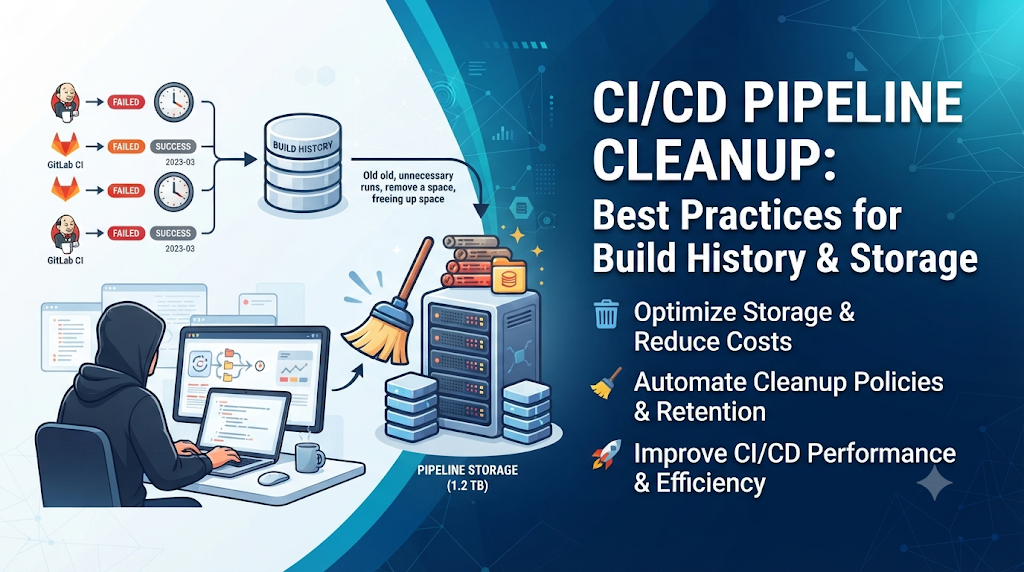
Modern CI/CD pipelines quickly accumulate thousands of successful, failed, and abandoned builds that consume valuable storage and clutter operational dashboards. Learning structured build history management is a core competency taught in professional training programs such as DevOpsSchool, helping teams maintain sustainable CI/CD environments. This guide explores why old pipeline runs accumulate and how you can establish safe, automated retention policies without risking accidental data loss.
Begin With a Pipeline That Never Forgets
Imagine walking into a warehouse where every box ever shipped, every empty pallet, every discarded shipping label, and every broken tool from the past five years has been left exactly where it fell. Finding a specific item becomes a slow, frustrating treasure hunt.
Many development teams run their CI/CD platforms the exact same way. Every pull request triggers a pipeline. Every commit spawns a new build. Feature branches are created, tested, abandoned, and forgotten, but the pipeline platform dutifully records every single execution.
Over time, this accumulation introduces severe friction:
- Storage Pressure: Unmanaged artifacts, logs, and container images consume hundreds of gigabytes—or even terabytes—of expensive cloud storage.
- Dashboard Clutter: Engineers trying to debug a current release have to scroll through walls of historical noise.
- Performance Degradation: CI/CD controllers running on bloated databases experience slower query times, sluggish user interfaces, and delayed job scheduling.
Unchecked build accumulation transforms a helpful automation server into an unmanageable storage liability.
What Counts as an Old Pipeline Run?
Before creating a cleanup strategy, it is vital to understand that a “pipeline run” is not a single monolithic file. Pipeline data consists of several distinct resource types, each with different storage footprints and retention requirements:
- Completed Pipeline Runs: The core metadata records showing execution status, timestamps, commit hashes, and user triggers.
- Failed and Cancelled Executions: Runs that aborted mid-way or failed due to syntax errors or test failures. These usually have little long-term value outside of immediate debugging.
- Old Build Logs: Detailed console output text files generated by each step of the build process.
- Temporary Build Artifacts: Compiled binaries, packages, and archives generated to pass data between stages or prepare for deployment.
- Test Reports and Coverage Files: JUnit XML reports, code coverage HTML pages, and linting summaries.
- Cached Dependencies and Workspaces: Node modules, Maven dependencies, pip caches, and container workspaces saved to speed up subsequent builds.
- Container Images: Docker or OCI images built during CI jobs and pushed to internal registries.
- Deployment Records and Release Metadata: Audit trails indicating who deployed what version to production and when.
Treating all these elements with a single rule is dangerous. For instance, while a temporary test artifact from a feature branch can safely be deleted after 7 days, a production deployment audit record may need to be retained for years to satisfy compliance standards.
Why Pipeline Cleanup Is an Operational Responsibility
Allowing pipeline data to grow indefinitely creates hidden risks across multiple dimensions of engineering operations:
- Increasing Storage Consumption: Cloud object storage (like AWS S3, Google Cloud Storage, or Azure Blob Storage) charges continuously for stored gigabytes. Bloated artifact repositories inflate monthly cloud bills.
- Higher Infrastructure Costs: CI/CD controllers store their execution history in underlying databases (such as PostgreSQL or MySQL). As table sizes grow into tens of millions of rows, database queries bog down, requiring expensive vertical scaling of database instances.
- Slower Navigation and Administration: Administrators spending minutes just to load a build history page lose valuable operational velocity.
- Difficulty Locating Useful Information: Signal gets lost in the noise. Finding the exact log file for a build that happened three weeks ago becomes difficult when buried under 50,000 automated nightly runs.
- Retention and Compliance Concerns: Keeping unnecessary data indefinitely can expose organizations to regulatory risks, particularly if old logs contain accidentally logged secrets, personal identifiable information (PII), or proprietary internal data.
However, deleting everything older than a fixed date (such as “delete all runs older than 30 days”) is a hazardous universal solution. If a critical security patch was released 45 days ago and an auditor requests the verification logs, an aggressive blanket cleanup script could destroy compliance evidence.
Create A Retention Policy Before Deleting Anything
A robust pipeline retention policy acts as a contract between development speed, storage limits, and compliance needs. Teams must design rules based on context rather than arbitrary calendar dates.
Key Factors in Retention Design
- Pipeline Status: Successful builds on release branches are valuable; failed builds on short-lived feature branches are disposable.
- Branch and Environment: Main/master branches and production environments require long retention; feature branches and pull request builds can be purged rapidly.
- Release Importance: Labeled releases, tagged versions, and candidate builds demand long-term preservation.
- Artifact Type: Large binary distributions need distinct rules compared to lightweight text logs or test reports.
- Audit and Compliance: Regulatory standards often mandate keeping specific build provenance records for years.
Illustrative Retention Policy Matrix
| Pipeline / Branch Type | Build Status | Log Retention | Artifact Retention | Cache Retention |
| Feature / PR Branches | Any | 7 Days | 3 Days | 24 Hours |
| Development / Staging | Success | 30 Days | 14 Days | 7 Days |
| Development / Staging | Failed | 14 Days | 7 Days | None |
| Production / Main | Success | 365 Days | 365 Days | 30 Days |
| Production / Main | Failed | 90 Days | 30 Days | None |
| Compliance / Tagged | Success | Permanent | Permanent | N/A |
A Safe Cleanup Workflow: From Inventory to Deletion
Executing cleanup operations without a structured workflow risks deleting active release artifacts or breaking active development pipelines. Follow this systematic operational process:
- Review Current Pipeline History and Storage Usage: Audit your CI/CD storage backends to identify which repositories, projects, or jobs consume the most space.
- Identify Old Runs and Large Artifacts: Pinpoint outliers—such as jobs producing multi-gigabyte artifacts due to incorrect build configurations.
- Separate Temporary Data from Important Release Records: Tag or isolate production-bound assets from ephemeral development runs.
- Check Retention and Audit Requirements: Consult security and compliance stakeholders to ensure mandatory logs are protected.
- Define Cleanup Rules and Exclusions: Establish clear inclusion and exclusion criteria (e.g., exclude tags matching
v*.*.*). - Test the Rules in a Non-Production Environment: Validate script logic or platform retention settings against a staging project.
- Run a Controlled Cleanup: Execute the cleanup using dry-run mode first to inspect exactly what will be removed.
- Verify Remaining Records: Confirm that active build histories and vital release artifacts remain intact.
- Review the Cleanup Results Periodically: Monitor storage savings and adjust retention windows as team velocity changes.
Platform-Specific Cleanup Approaches
Different CI/CD platforms implement storage management and retention policies in unique ways. Understanding these platform-specific mechanisms prevents unexpected data loss.
Jenkins
Jenkins stores build records as flat files on disk within the JENKINS_HOME directory (jobs/[job-name]/builds/[build-number]).
- Capabilities: Historically managed via the Discard Old Builds setting built into every job configuration. Modern Jenkins relies heavily on the Build Retainers plugin or Pipeline configuration blocks (
properties([buildDiscarder(logRotator(numToKeepStr='30', artifactNumToKeepStr='10'))])). - Precautions: Deleting jobs or builds directly from the file system without updating Jenkins’ internal indexes can corrupt the build history XML metadata. Always use Jenkins configuration settings or Groovy scripts executed via the Script Console for bulk cleanups.
GitHub Actions
GitHub Actions manages workflows, logs, and artifacts through repository-level and organization-level settings.
- Capabilities: Artifact and log retention can be configured in repository settings. By default, workflow run logs and artifacts are retained for 90 days for public repositories, but this can be customized for private repositories (from 1 to 400 days) via
retention-daysin workflow YAML files or repository settings. - Precautions: Deleting workflow runs via the GitHub REST API removes both run history and associated artifacts simultaneously. Ensure critical release artifacts are uploaded to GitHub Releases or an external artifact repository (like Nexus or Artifactory) rather than relying solely on workflow artifacts.
GitLab CI/CD
GitLab provides comprehensive automated housekeeping for pipelines, artifacts, and container registries.
- Capabilities: Configure artifact expiration using
expire_inkeywords inside.gitlab-ci.yml. Project-level settings allow administrators to define retention policies for pipeline logs, test reports, and job artifacts. GitLab also includes container registry tag expiration policies. - Precautions: Setting global expiration rules can inadvertently purge artifacts needed by downstream dependent projects. Use protected branches to shield release pipelines from aggressive artifact expiration rules.
Azure DevOps
Azure DevOps manages retention through pipeline retention leases and project settings.
- Capabilities: Azure DevOps uses the concept of “retention leases” to protect pipeline runs associated with deployments or releases from automatic cleanup. Project settings define default and maximum retention days for pipeline runs, artifacts, and pull request builds.
- Precautions: Manual runs or pipelines triggered via API do not always receive automatic retention leases unless explicitly configured, making them susceptible to default retention sweeps.
Automating Cleanup Without Creating New Risks
Relying on manual deletion is unsustainable. True DevOps maintenance requires automation. However, automated deletion scripts carry inherent risks—a misconfigured script can wipe out critical production logs.
Core Pillars of Safe Automation
- Scheduled Cleanup Execution: Run cleanup jobs during off-peak hours (e.g., Sunday mornings) to minimize performance impact on active CI/CD databases.
- Age-Based and Status-Based Filters: Ensure scripts evaluate both age (
created_date < NOW() - INTERVAL '90 days') and status (status = 'FAILED' OR status = 'CANCELLED'). - Excluding Protected Branches: Implement hardcoded filters in scripts to ignore branches matching
main,master,production, or release tags. - Permission Controls: Restrict execution rights for cleanup scripts to dedicated service accounts with minimal necessary permissions.
- Logging Cleanup Activity: Output structured audit logs detailing every run ID, artifact name, and size deleted.
- Failure Notifications: Integrate alerting so that if a cleanup script encounters errors or attempts to delete above a safety threshold (e.g., >50% of total records), an alert fires immediately.
- Dry-Run and Approval Options: Always implement a
--dry-runflag that reports what would be deleted without executing the deletion API calls.
Conceptual Automation Script (Python Pseudocode)
Python
import datetime
import requests

API_ENDPOINT = "https://ci.internal.net/api/v1/builds"
HEADERS = {"Authorization": "Bearer SERVICE_TOKEN"}

def fetch_old_builds():
    threshold_date = datetime.datetime.now() - datetime.timedelta(days=60)
    response = requests.get(API_ENDPOINT, headers=HEADERS)
    builds = response.json()

    candidates = []
    for build in builds:
        build_date = datetime.datetime.fromisoformat(build['created_at'])
        branch = build['branch']
        status = build['status']

        # Exclude protected branches and successful production builds
        if branch in ['main', 'production'] and status == 'SUCCESS':
            continue

        if build_date < threshold_date:
            candidates.append(build['id'])

    return candidates

def execute_cleanup(dry_run=True):
    build_ids = fetch_old_builds()
    print(f"Found {len(build_ids)} builds eligible for cleanup.")

    for b_id in build_ids:
        if dry_run:
            print(f"[DRY-RUN] Would delete build ID: {b_id}")
        else:
            delete_resp = requests.delete(f"{API_ENDPOINT}/{b_id}", headers=HEADERS)
            print(f"Deleted build ID {b_id}: Status {delete_resp.status_code}")

if __name__ == "__main__":
    execute_cleanup(dry_run=True)
Protecting Important Logs, Artifacts, and Release Evidence
While cleaning up clutter is essential, destroying critical business records can lead to compliance failures and blocked incident investigations. Teams must establish clear boundaries between disposable build noise and permanent release evidence.
What Must Never Be Accidentally Deleted
- Production Release Artifacts: Final binaries, containers, and packages deployed to live environments.
- Security Scan Reports: Static Application Security Testing (SAST), Dynamic Application Security Testing (DAST), and Software Bill of Materials (SBOM) reports generated during release pipelines.
- Compliance Evidence: Audit trails proving that code passed required quality gates, peer reviews, and security sign-offs before deployment.
- Deployment Approvals: Manual gate approvals and sign-off records stored by release management tools.
- Incident Investigation Logs: Detailed console outputs from builds associated with past production outages or security incidents.
- Build Provenance: Cryptographic hashes, SLSA provenance attestations, and dependency lock files verifying software supply chain integrity.
Archival vs. Deletion
Instead of deleting important artifacts forever, mature organizations implement an archival tiering strategy:
- Keep active build history in the primary CI/CD datastore for 30 to 90 days.
- Export critical release artifacts, SBOMs, and audit logs to cold storage (such as encrypted Amazon S3 Glacier or equivalent long-term repositories) for 1 to 7 years.
- Purge ephemeral logs, intermediate build caches, and failed feature branch runs entirely.
Troubleshooting Cleanup Problems
Even with well-designed policies, pipeline cleanup processes can encounter operational hurdles. Here are common issues and how to resolve them:
1. Cleanup Jobs Failing Due to Insufficient Permissions
- Symptom: Automated cleanup scripts return
403 Forbiddenor permission denied errors when attempting to delete builds. - Resolution: Verify that the API token or service account associated with the cleanup job possesses explicit administrative permissions scoped specifically to repository deletion or artifact management, rather than standard user rights.
2. Artifacts Remaining After Pipeline Run Deletion
- Symptom: Database size decreases, but object storage (S3/Blob) costs remain high after deleting old pipeline runs.
- Resolution: Ensure cleanup workflows invoke artifact deletion endpoints explicitly. Many CI/CD platforms decouple run metadata deletion from underlying artifact storage deletion to prevent accidental data loss. Implement lifecycle rules on your cloud object storage buckets (e.g., automatically expire objects in the
ci-artifacts/temp/prefix after 14 days).
3. Shared Caches Being Removed Unexpectedly
- Symptom: Subsequent builds slow down significantly because dependency caches were wiped out prematurely.
- Resolution: Separate cache retention policies from build history policies. Caches should be managed using Least Recently Used (LRU) eviction algorithms rather than rigid age-based expiration dates.
4. Retention Settings Not Applying as Expected
- Symptom: Old builds persist despite configuring retention rules.
- Resolution: Check for project-level or branch-level overrides that take precedence over global platform settings. Verify that background worker queues responsible for processing expirations are running correctly.
5. Cleanup Scripts Selecting the Wrong Branch or Environment
- Symptom: Important staging or production release runs are mistakenly purged.
- Resolution: Implement rigorous unit testing and dry-run validation for custom cleanup scripts. Use explicit allowlists for branch names rather than complex regex exclusions that may fail edge cases.
Measuring the Results of Pipeline Cleanup
To justify maintenance efforts and ensure ongoing operational health, platform teams should track key metrics before and after implementing cleanup policies:
- Storage Consumption Volume: Measure total gigabytes consumed across CI/CD databases, artifact repositories, and log storage buckets.
- Retained Artifact Volume: Track the ratio of useful release artifacts versus temporary build clutter.
- Cleanup Job Success Rate: Monitor whether automated retention scripts execute cleanly without errors or timeouts.
- Administrative Effort: Measure reduction in time spent by engineers troubleshooting slow CI/CD dashboards or database bloat.
- Compliance Audit Readiness: Verify that required production provenance records remain fully accessible and verifiable.
Establishing a pre-cleanup storage baseline allows teams to quantify cost savings and performance improvements over time.
Practical Checklist for CI/CD Administrators
Use this concise checklist to guide your organization’s pipeline cleanup implementation:
- Inventory & Assessment: Audit current pipeline storage usage, database size, and artifact repository volumes.
- Policy Definition: Establish clear retention tiers based on branch type, build status, and compliance requirements.
- Exclusions Configured: Protect main branches, production tags, compliance evidence, and security scan reports from automatic deletion.
- Permissions Secured: Restrict cleanup execution rights to dedicated, audited service accounts.
- Testing & Dry-Runs: Validate retention rules and scripts in a non-production environment with dry-run mode enabled.
- Automation Setup: Schedule automated cleanup executions during off-peak operational hours.
- Verification: Confirm that active build histories remain functional and unneeded clutter is successfully removed.
- Periodic Review: Schedule quarterly reviews of retention policies as team workflows and storage costs evolve.
Frequently Asked Questions
Why should old pipeline runs be deleted?
Deleting old pipeline runs prevents uncontrolled storage growth, reduces cloud infrastructure costs, speeds up database queries, and declutters CI/CD dashboards so engineers can focus on relevant build history.
Is it safe to delete failed pipeline runs?
Generally, yes. Failed pipeline runs on short-lived feature branches or pull requests rarely have long-term value. However, failed runs on production or release branches should be retained temporarily for incident investigation.
How long should CI/CD pipeline history be retained?
Retention depends on organizational needs. Ephemeral feature branches can often be purged after 7 to 14 days, while production release builds and compliance logs may need to be retained for 1 to 7 years.
What is the difference between deleting a pipeline run and deleting its artifacts?
Deleting a pipeline run removes the execution metadata and database records, whereas deleting artifacts removes the heavy binary files, build outputs, and test reports generated during the build. Many platforms require both actions to fully reclaim storage.
Can pipeline cleanup be automated?
Yes. Most CI/CD platforms offer native retention settings, scheduled jobs, and API endpoints that allow administrators to automate cleanup securely.
How do teams preserve production release records?
Teams preserve production records by implementing retention leases, applying exclusion rules for tagged releases, or exporting critical artifacts and compliance evidence to long-term cold storage archival systems.
Does deleting old runs also clear build caches?
Not always. Build caches (like dependency caches) often operate on separate storage lifecycles and require dedicated LRU (Least Recently Used) expiration policies to prevent storage bloat.
How can teams clean up Jenkins build history?
Jenkins administrators can use job configuration settings like Discard Old Builds, configure Groovy scripts via the Script Console, or utilize pipeline declarative syntax blocks to manage log rotation.
What should be checked before running a cleanup script?
Always run cleanup scripts in a --dry-run or preview mode first, verify branch exclusions, ensure database backups exist, and confirm that service account permissions are correctly scoped.
How often should pipeline retention policies be reviewed?
Retention policies should be reviewed at least semi-annually or whenever there are significant shifts in organizational compliance requirements, team size, or cloud storage budgets.
Final Thoughts: Keep Pipeline History Useful, Not Endless
Effective pipeline cleanup is not about aggressive data destruction, but about maintaining operational clarity and cost efficiency. By implementing structured, automated retention policies, teams can keep their CI/CD environments fast and easy to navigate while preserving vital compliance evidence and release logs. Ultimately, striking the right balance between cleanup and preservation ensures your pipeline remains a high-performance engine for software delivery.