




Introduction
The modern software landscape demand for rapid feature delivery has made automated release management essential for operational survival, forcing engineering teams to replace risky, manual deployment handoffs with predictable pipelines. In traditional setups, developers worked on isolated branches for long periods, leading to severe integration conflicts—often called “merge hell”—and critical bugs that were discovered too late by siloed teams. Implementing automated workflows transforms these friction points into efficient release pipelines that allow organizations to catch defects early, cut down on engineering overhead, and safely deploy software updates. For teams seeking comprehensive domain expertise and structured training programs in these automated methodologies, platforms like DevOpsSchool offer deep, practitioner-led learning pathways to master Continuous Integration (CI) and Continuous Delivery (CD) architectures.
What Is Continuous Integration (CI)?
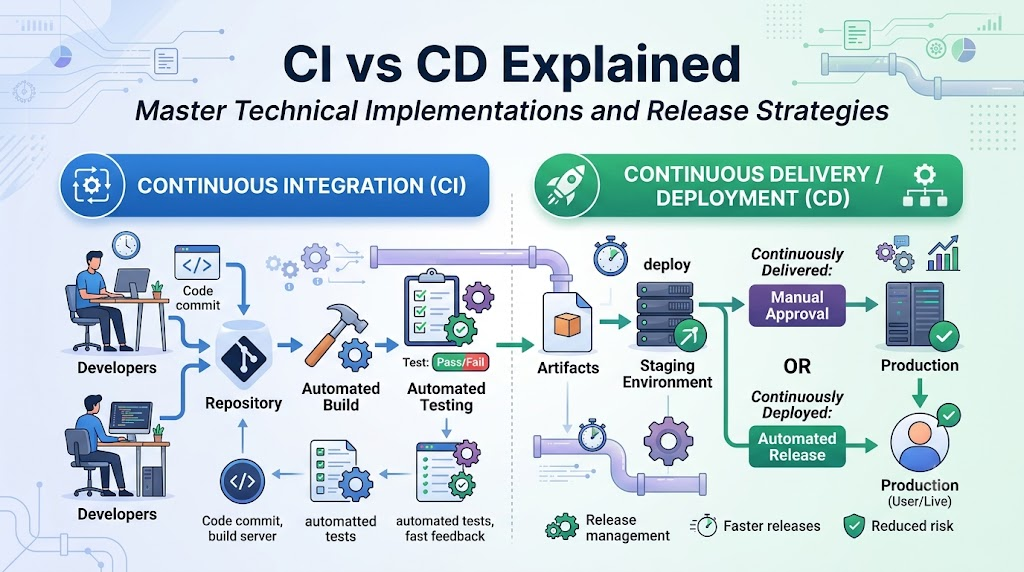
Continuous Integration is a technical practice where developers frequently merge their code changes into a central repository, triggering automated builds and test suites. Instead of working on isolated branches for long periods, engineers push code changes multiple times a day.
Every commit pushed to the version control system triggers an automated build engine. This environment automatically compiles the source code, resolves dependencies, and verifies syntax integrity. Automated compilation ensures that the codebase remains stable and prevents broken configurations from impacting other team members.
Automated testing runs immediately after the build phase finishes successfully. This includes executing unit tests, code style linters, and static application security testing (SAST) tools. Running these automated checks gives development teams immediate feedback on whether their code contains regressions or security flaws.
Early issue detection is the primary benefit of a well-implemented CI system. Catching bugs when code changes are small makes troubleshooting direct and straightforward. Engineers can fix defects immediately before technical debt accumulates, keeping the primary release branch stable and deployment-ready.
What Is Continuous Delivery (CD)?
Continuous Delivery is a software engineering practice where code changes are automatically built, tested, and prepared for a release to production. It extends Continuous Integration by ensuring that the artifact produced during the CI stage is automatically validated and ready for deployment at any time.
Release readiness means that the software artifact undergoes thorough validation as it moves through the pipeline. The system runs integration tests, performance benchmarks, and user acceptance tests (UAT) within environments that mirror production. This testing confirms that the application can be safely deployed without impacting users.
Automated deployment pipelines manage the movement of software artifacts between different environments. The pipeline automates infrastructure provisioning, configuration updates, and artifact distribution across staging, pre-production, and canary environments. This minimizes manual configuration errors across the entire infrastructure.
Controlled production releases are a core feature of Continuous Delivery. While the pipeline automates artifact validation and preparation, shipping to the live production environment requires human approval. Business leaders or release managers click a button to approve the deployment, ensuring that feature releases align with marketing, compliance, and business schedules. This accelerates delivery cycles while giving organizations complete control over their production releases.
Continuous Delivery vs Continuous Deployment
Understanding the distinction between Continuous Delivery and Continuous Deployment is critical for designing an enterprise release strategy. Both practices share the same upstream CI foundations, but they differ significantly in their final release phases.
| Area | Continuous Delivery | Continuous Deployment |
| Human Approval | Required before pushing code updates to live production environments. | Entirely eliminated; code flows directly to production if all automated tests pass. |
| Automation Level | Automated up to the staging/readiness verification stage. | Fully automated from the initial code commit through production delivery. |
| Release Control | Managed by business requirements, product managers, or operations staff. | Managed programmatically by the outcome of automated test validation suites. |
| Risk Profile | Lower operational risk for legacy systems or compliance-driven software. | Requires advanced monitoring, automated rollbacks, and strong test coverage. |
| Use Cases | Enterprise financial engines, embedded devices, regulated software platforms. | Modern SaaS products, web applications, cloud-native microservices. |
Continuous Delivery leaves the final deployment step as a manual operational task. The software is always kept in a deployable state, but deployment to production is triggered intentionally by human intervention. This works well for organizations that must coordinate releases around compliance audits, marketing campaigns, or maintenance windows.
Continuous Deployment removes human intervention from the final release step. Every code change that passes all validation stages is automatically deployed straight to production. This model allows engineering teams to ship features and bug fixes to users within minutes of writing the code. However, it requires comprehensive test coverage, robust observability, and automated rollback strategies to handle production issues without manual intervention.
CI vs CD: Key Differences
While Continuous Integration and Continuous Delivery work together within a unified pipeline, they focus on different stages of the software delivery lifecycle.
| Area | Continuous Integration (CI) | Continuous Delivery (CD) |
| Primary Objective | Validate code changes and detect integration conflicts early. | Maintain a reliable, deployable codebase that can be shipped safely at any time. |
| Workflow Stage | Focuses on the initial phase of development (commit, build, unit test). | Focuses on the later stages of lifecycle delivery (staging, configuration, production). |
| Automation Focus | Automates code compilation, code quality linting, and unit validation. | Automates infrastructure setups, integration suites, and application staging. |
| Testing Role | Executes unit tests, component tests, and static security analysis. | Executes integration testing, performance testing, and smoke validation. |
| Deployment Involvement | Does not manage infrastructure provisioning or target server deployment. | Directs environment configuration, artifact routing, and release staging. |
| Business Impact | Boosts developer productivity and stops code regression bugs early. | Minimizes time-to-market and shortens feedback loops for users. |
Continuous Integration centers on the development experience. It helps developers safely share code and verify that new additions do not break existing functionality. The boundary of CI ends when a verified build artifact is successfully created and stored.
Continuous Delivery focuses on the operational and release phases of the lifecycle. It takes the validated artifact from the CI stage and guides it through complex environment topologies, functional verifications, and release approvals. This ensures that valid code translates directly into stable business value for end users.
CI/CD Workflow Explained
An optimized CI/CD workflow functions as an automated assembly line for software changes. The pipeline contains distinct validation stages that ensure high code quality.
Code Commit ➔ Build Automation ➔ Automated Testing ➔ Artifact Creation ➔ Deployment Validation ➔ Staging Environment ➔ Production Release ➔ Monitoring & Feedback
1. Code Commit
The workflow begins when a developer pushes code changes to a shared repository, such as Git. This commit triggers a webhook that starts the automated pipeline engine.
2. Build Automation
The CI server detects the commit webhook, creates an isolated environment, and checks out the source code. It then compiles the binaries, pulls required software packages, and resolves external dependencies.
3. Automated Testing
The build engine runs unit tests, style checkers, and static code analysis tools. These tests check the internal logic of the code changes and flag any regressions before the artifact is generated.
4. Artifact Creation
Once the tests pass, the pipeline packages the application into a deployable format, such as a Docker container image, a Java JAR archive, or a zipped package. This immutable artifact is then uploaded to a secure repository or registry.
5. Deployment Validation
The pipeline retrieves the immutable artifact from the registry and runs sanity tests against an ephemeral validation environment. This step confirms the artifact can initialize properly and read basic configuration parameters.
6. Staging Environment
The artifact is deployed to a staging environment that mirrors production. Here, the system runs integration tests, security vulnerability scans, and performance benchmarks to evaluate application stability under realistic conditions.
7. Production Release
Depending on the chosen strategy, the artifact is moved to production either automatically (Continuous Deployment) or after manual sign-off (Continuous Delivery). Teams often use advanced deployment patterns, like blue-green or canary rollbacks, to minimize user impact.
8. Monitoring & Feedback
Telemetry tools track application performance, error rates, and user logs immediately after deployment. If anomalies occur, the system triggers automated rollback routines to restore the previous stable version.
Why Organizations Need CI and CD
Implementing CI/CD pipelines addresses long-standing bottlenecks in software delivery. It helps engineering teams improve both their operational speed and product stability.
- Faster Releases: Automating build, test, and deployment workflows removes manual handoffs between teams. This allows organizations to ship bug fixes and new features to users in hours instead of months.
- Better Software Quality: Running automated test suites on every commit prevents bugs from reaching production. Catching defects early in development makes them cheaper and easier to fix.
- Reduced Manual Effort: Automating repetitive setup tasks frees engineers from manual deployment duties. Development teams can spend less time configuring environments and more time writing high-value features.
- Lower Deployment Risks: Shipping software in small, incremental updates makes production changes smaller and less risky. If an issue occurs, finding the root cause is straightforward because the change history is clear.
- Improved Customer Satisfaction: Shipping updates quickly allows businesses to respond fast to user feedback and changing market conditions. Regular, stable updates build user trust and keep products competitive.
Common CI Use Cases
Continuous Integration benefits a wide range of development projects, from small open-source applications to complex corporate platforms.
- Feature Development: Multiple developers can work on separate tasks within a shared repository simultaneously. Frequent automated testing allows them to merge code into the main branch daily without breaking existing features.
- Team Collaboration: Automated pull request reviews ensure all team contributions meet defined code quality, formatting, and security baselines before integration.
- Automated Quality Checks: Teams can enforce strict code linting and style guidelines automatically. This maintains consistent formatting across the codebase without requiring manual reviews.
- Open-Source Projects: Project maintainers can use automated build pipelines to validate code submissions from public contributors, ensuring external pull requests do not break the main project.
- Enterprise Development: Large teams can easily track and manage hundreds of daily code contributions across microservice architectures, preventing integration issues.
Common CD Use Cases
Continuous Delivery provides reliable, repeatable deployment pathways for modern infrastructure architectures.
- SaaS Platforms: Cloud software providers can deliver weekly updates, security patches, and interface enhancements to users without causing system downtime.
- Cloud-Native Applications: Teams can manage microservice applications running on container platforms like Kubernetes, scaling services and updating single components independently.
- E-Commerce Platforms: Retail platforms can deploy promotional features, checkout optimizations, and inventory updates quickly during high-traffic shopping seasons while minimizing downtime risk.
- Mobile Application Releases: Development teams can automate the build, testing, and submission phases for mobile app store releases, ensuring binary updates are always ready for distribution.
- Enterprise Software Delivery: Highly regulated organizations can automate validation and staging phases, keeping software deployable while maintaining manual release controls for compliance tracking.
Core Tools Supporting CI/CD
Building an effective CI/CD pipeline requires selecting a reliable set of tools across the development lifecycle.
| Tool Category | Purpose | Example Usage |
| Source Control | Manages code versions, handles pull requests, and hosts repositories. | Git, GitHub, GitLab, Bitbucket |
| Build Automation | Compiles application code and resolves external package dependencies. | Jenkins, GitHub Actions, GitLab CI, Maven |
| Test Automation | Runs unit, integration, and end-to-end testing suites automatically. | JUnit, Selenium, Cypress, PyTest |
| Artifact Management | Stores and secures compiled binaries and container images. | Sonatype Nexus, JFrog Artifactory, Docker Hub |
| Deployment Tools | Provisions cloud infrastructure and manages production rollouts. | Ansible, Terraform, ArgoCD, AWS CodeDeploy |
| Monitoring Platforms | Tracks application metrics, application health, and error logs. | Prometheus, Grafana, Datadog, New Relic |
Measuring CI/CD Success
To evaluate a CI/CD pipeline, organizations track Key Performance Indicators (KPIs) focused on operational speed, delivery quality, and system stability.
| Metric | Why It Matters | Business Value |
| Deployment Frequency | Measures how often code updates are successfully shipped to production. | Shows team agility and how fast the organization can deliver value to users. |
| Lead Time for Changes | Tracks the time it takes for a code commit to reach production. | Measures pipeline efficiency and the responsiveness of the development cycle. |
| Build Success Rate | Tracks the percentage of automated pipeline builds that complete successfully. | Highlights codebase stability and identifies flaky or broken test configurations. |
| Change Failure Rate | Measures the percentage of production deployments that cause a service outage or require a rollback. | Reflects the quality of automated testing and staging validation steps. |
| Mean Time to Recovery (MTTR) | Tracks how long it takes to restore service after a production outage occurs. | Measures system observability, rollback speed, and operational resilience. |
| Release Cycle Time | Measures the total time required to plan, build, test, and deliver a feature. | Provides clear timelines for product planning and business roadmaps. |
CI/CD Adoption Challenges
Adopting automated delivery workflows often presents organizational and technical hurdles that teams must navigate carefully.
| Challenge | Impact | Recommended Solution |
| Legacy Systems | Tight coupling and outdated tech stacks make automated builds difficult. | Break applications into smaller microservices and isolate legacy code components. |
| Manual Processes | Legacy approval gates slow down delivery and create operational logjams. | Automate testing tiers and shift approval steps upstream into code review phases. |
| Skills Shortages | Teams may lack experience with modern infrastructure automation and orchestration tools. | Invest in technical training platforms like DevOpsSchool to build internal engineering skills. |
| Tool Integration Complexity | Disconnected tools can fragment pipelines and obscure system data. | Standardize on integrated delivery platforms and use declarative pipeline files. |
| Security Concerns | Automated pipelines can become targets for credential theft or malicious code. | Embed security scanning directly into the pipeline and rotate access keys regularly. |
| Cultural Resistance | Siloed development and operations teams may resist changing established workflows. | Foster shared ownership of uptime and production quality across all teams. |
Best Practices for CI/CD Implementation
- Commit Code Frequently: Developers should merge code changes into the shared primary branch at least once a day. This keeps change sizes small and reduces integration conflicts.
- Automate Testing: Move beyond simple unit tests. Include comprehensive integration testing, UI validation, and security regression checks within the automated pipeline.
- Use Infrastructure as Code (IaC): Define your environments using tools like Terraform or Ansible. This keeps deployment environments consistent and prevents configuration drift.
- Integrate Security Early: Scan container images for vulnerabilities and audit dependencies during the build phase before artifacts are generated.
- Monitor Continuously: Set up real-time dashboards to track application health metrics, system performance, and pipeline error rates.
- Improve Incrementally: Start by automating simple compilation and unit testing steps. Expand to more complex deployment and environment configurations over time.
Real-World Example: Enterprise Case Study
An enterprise retail platform was struggling with slow software releases. They operated a large web application supported by disconnected engineering teams.
Initial Release Challenges
The company used a manual release strategy. Developers worked on isolated feature branches for up to a month. Merging this code led to significant integration errors, often called “merge hell.” Testing was performed manually by a separate QA team, which took two weeks per release. As a result, the company could only ship software updates once a quarter. These manual releases were stressful events that frequently caused system downtime and user complaints.
CI Implementation
The engineering leadership restructured their development workflow. They required engineers to merge code into the primary branch daily. The team set up an automated CI server configured to trigger on every code commit. This pipeline compiled application files, performed code style validation, and executed a suite of unit tests. Pushing code that failed these checks blocked integration, giving developers immediate feedback to fix errors quickly.
CD Implementation
With a stable CI foundation in place, the company automated its deployment stages. They used Infrastructure as Code tools to dynamically provision staging environments that mirrored production. When a build passed the initial CI checks, the pipeline automatically deployed the artifact to these staging environments and ran automated integration tests.
They adopted a Continuous Delivery model: once the artifact passed all automated tests, it was held for final release approval. Business managers could then deploy the update to production with a single click using a blue-green strategy to eliminate system downtime.
KPI Improvements
- Deployment Frequency: Increased from 1 release per quarter to multiple updates per week.
- Lead Time for Changes: Dropped from 30+ days down to under 4 hours.
- Change Failure Rate: Decreased from 35% down to less than 4%.
- Mean Time to Recovery (MTTR): Dropped from several hours down to under 5 minutes using automated rollbacks.
Business Outcomes & Lessons Learned
Automating the delivery pipeline allowed the retailer to launch new features ahead of their competitors and deploy critical security fixes instantly. The engineering team shifted from stressful manual deployment cycles to predictable, routine software updates.
A key lesson learned was that tooling alone is not enough; success requires a cultural shift toward daily code integration and shared responsibility for software quality.
Common Misconceptions
- CI and CD Are the Same Thing: While closely related, they have distinct goals. CI focuses on daily code integration and automated validation, while CD focuses on organizing, staging, and deploying those validated builds into production.
- Automation Removes All Risk: Automation eliminates human configuration errors and ensures repeatable processes, but it cannot fix poorly written code or flawed application logic. Bad code will simply be deployed faster if your automated tests do not catch the errors.
- CI/CD Is Only for Large Organizations: Small teams benefit significantly from automation. Automating repetitive build and deployment tasks saves valuable engineering hours, allowing small teams to focus on building core product features.
- More Tools Guarantee Success: Using a large collection of disjointed tools often increases pipeline complexity. Focus on building clean, well-integrated workflows using a few core tools rather than managing an over-engineered toolchain.
- CI/CD Is Purely a Technical Initiative: Technology is only one part of the equation. Successfully adopting CI/CD requires changing team mindsets around collaboration, breaking down silos between developers and operators, and embracing iterative software delivery.
CI/CD Maturity Model
Organizations typically progress through distinct levels of automation as they mature their engineering processes.
Level 1: Manual Builds & Releases ➔ Level 2: Automated Builds ➔ Level 3: Continuous Integration ➔ Level 4: Continuous Delivery ➔ Level 5: Continuous Deployment
Level 1 – Manual Builds & Releases
Developers compile application code locally on their machines. Software artifacts are manually copied to target servers over SSH or FTP. Documentation is often missing or outdated, making deployments unpredictable and dependent on specific individuals.
Level 2 – Automated Builds
The team uses a central build engine to compile code and package artifacts automatically when triggered. However, testing, staging setup, and production releases still require manual execution and human intervention.
Level 3 – Continuous Integration
Developers integrate code changes daily into a shared main branch. The build engine automatically runs unit tests and static analysis on every commit. Code regressions are caught early, keeping the primary branch stable.
Level 4 – Continuous Delivery
The delivery pipeline automatically moves validated artifacts through staging environments where integration and performance tests are run. The software is always kept in a deployable state, with final production rollouts controlled by a manual business sign-off.
Level 5 – Continuous Deployment
Human intervention is removed from the deployment path. Every code change that passes the automated test suites flows directly to the live production environment. The infrastructure uses automated monitoring and rollback mechanisms to manage system health.
Future of CI/CD
The software delivery space continues to evolve as new engineering patterns and technologies emerge.
- AI-Assisted Pipelines: Artificial intelligence tools are being integrated into deployment pipelines to analyze build logs, optimize test execution order, and predict deployment failures before they impact users.
- Intelligent Testing: Modern test frameworks use impact analysis to run only the specific tests affected by a code change. This speeds up feedback times by avoiding running the entire test suite for minor updates.
- DevSecOps Integration: Security scanning is moving earlier in the delivery pipeline. Static analysis, dependency scanning, and compliance checks run automatically during the initial build phase.
- Platform Engineering: Internal developer platforms (IDPs) are becoming popular. They provide self-service infrastructure templates that help developers set up secure, compliant CI/CD pipelines without needing deep cloud expertise.
- GitOps Adoption: Cloud-native environments are shifting toward GitOps models. Git repositories serve as the single source of truth for infrastructure and application states, with automated controllers matching the live environment to the stored configurations.
- Predictive Deployment Analytics: Deployment platforms use advanced telemetry data to evaluate production health during updates, automatically slowing down or rolling back releases if system anomalies are detected.
Certifications & Learning Paths
Building a successful career in modern software delivery requires structured training and validated technical skills.
| Certification Area | Best For | Skill Level | CI/CD Relevance |
| DevOps | Systems Engineers, Software Developers, Release Specialists | Intermediate | Teaches core pipeline design, automated delivery concepts, and team collaboration frameworks. |
| Cloud | Solutions Architects, Cloud Infrastructure Engineers | Advanced | Focuses on managing managed build tools, cloud pipelines, and target infrastructure. |
| Kubernetes | Platform Architects, Container Specialists | Advanced | Explains container orchestration, declarative microservice deployments, and GitOps workflows. |
| DevSecOps | Security Analysts, Automated Compliance Engineers | Intermediate | Teaches how to embed security scanning, secret management, and vulnerability checks into pipelines. |
| Platform Engineering | Site Reliability Engineers, Internal Infrastructure Architects | Advanced | Focuses on building scalable, self-service developer tools and automated internal platforms. |
| SRE | Systems Architects, Site Reliability Engineers | Advanced | Explains telemetry setups, automated rollback systems, and application uptime optimization. |
For engineers seeking structured guidance through these career domains, the DevOpsSchool learning ecosystem offers comprehensive training programs led by experienced industry instructors to help students master these cloud automation architectures.
CI/CD Readiness Checklist
- Assess Current Delivery Process: Map out your existing software release path. Identify manual handoffs, frequent integration bottlenecks, and steps that regularly cause deployment delays.
- Automate Builds: Set up a centralized build server to compile code, download software dependencies, and package artifacts automatically whenever code is pushed.
- Implement Automated Testing: Write comprehensive unit test suites and integrate them directly into the build pipeline. Enforce rules that block broken code from being merged.
- Create Deployment Pipelines: Build automated paths to distribute compiled software artifacts across staging and testing environments consistently using Infrastructure as Code.
- Monitor Delivery Metrics: Track core delivery performance KPIs like deployment frequency, change failure rates, and build success metrics using automated system dashboards.
- Continuously Optimize Workflows: Regularly review pipeline execution logs to identify slow test phases, optimize caching strategies, and remove unnecessary approval gates.
FAQs
What is the difference between CI and CD?
Continuous Integration (CI) focuses on regularly merging code changes into a shared central repository and running automated builds and tests to catch defects early. Continuous Delivery (CD) builds on this by automatically preparing those validated changes for deployment to a staging or production environment, keeping the application ready to release at any time.
Is Continuous Delivery the same as Continuous Deployment?
No. Continuous Delivery leaves the final deployment step to human discretion; code is automatically validated and kept ready for release, but a person must approve the production rollout. Continuous Deployment removes this manual step entirely, automatically shipping every change that passes all validation tests directly to production.
Why is CI important?
Continuous Integration prevents long-lived code branches that lead to severe integration conflicts when merged. By testing small code changes frequently, teams can discover and fix bugs early in development before they become costly to resolve.
What are the benefits of CD?
Continuous Delivery shortens time-to-market by removing manual environment setup steps and deployment handoffs. It lowers release risk by shipping code in small, routine increments and ensures the software can be deployed reliably at any time.
Which metrics should teams track?
Teams should track the four core DORA metrics: deployment frequency, lead time for changes, change failure rate, and mean time to recovery (MTTR). Tracking build success rates and overall release cycle times also provides helpful pipeline insight.
Can small teams implement CI/CD?
Yes. Small teams benefit significantly from automation because it removes manual infrastructure management overhead. Automating builds and deployments saves valuable engineering time, allowing small teams to focus on building core product features.
What tools are commonly used?
Common tools include Git for version control; Jenkins, GitHub Actions, or GitLab CI for build orchestration; Docker and Sonatype Nexus for artifact management; and Terraform, Ansible, or ArgoCD for infrastructure provisioning and application deployment.
How should organizations get started?
Start by analyzing your current release process to find manual bottlenecks. Automate code compilation and unit testing first, then expand your pipeline to manage staging deployments and automated infrastructure integration over time.
Does CI/CD eliminate all deployment risks?
No. While it eliminates manual setup errors and ensures repeatable deployments, it cannot fix architectural issues, broken logic, or poor code quality if your automated test suites do not catch them.
What is the role of testing in CI/CD?
Testing serves as the quality gate for the pipeline. It automatically validates code changes at various stages—using unit tests during the CI phase, and performance or integration tests during the CD phase—ensuring only high-quality updates move forward.
How does GitOps relate to CI/CD?
GitOps is a modern approach to Continuous Delivery that uses Git repositories as the single source of truth for infrastructure configuration files. Automated controllers track these files and update live environments to match the configurations stored in Git.
What is blue-green deployment?
A blue-green deployment is a release strategy that uses two identical production environments (named Blue and Green). One environment handles live traffic while the new version is deployed and tested in the other. Once validated, traffic is switched over instantly to minimize downtime.
How does DevSecOps fit into CI/CD?
DevSecOps embeds security practices directly into the automated delivery pipeline. This ensures security scans, dependency reviews, and compliance checks run automatically during the build and staging phases rather than as a manual step at the end.
Why do pipelines fail most frequently?
Pipelines most often fail due to flaky or poorly written automated tests, misconfigured environment variables, dependency drift, or permission errors when interacting with cloud environments.
How often should developers commit code in a CI framework?
Developers should commit and merge their code changes into the primary shared branch at least once a day. Frequent integration keeps individual changes small and easy to troubleshoot if a build breaks.
Final Thoughts
Transitioning to automated CI/CD practices is a foundational step toward modern engineering efficiency. By replacing error-prone manual tasks with automated build, test, and deployment workflows, organizations can deliver high-quality software reliably and quickly.
Success requires focusing on automated testing, rolling out updates in small increments, tracking clear operational KPIs, and building a culture of shared engineering responsibility. Teams should adopt automation step-by-step, optimizing their delivery pipelines continuously to meet evolving business goals.