




Introduction
The landscape of software delivery has shifted dramatically over the past two decades. In the early days of enterprise computing, the separation between those who wrote code and those who managed the infrastructure was rigid. Developers built applications, handed them over the wall to operations teams, and hoped for the best. This “throw it over the wall” mentality created silos, friction, and significant delays.
Today, the velocity of business requires software updates in hours, not months. As organizations struggle with these demands, a fundamental debate has emerged: DevOps vs Traditional IT Operations.
At DevOpsSchool, we have spent years guiding organizations through the nuances of this transition. It is not just about adopting new tools; it is about changing how people work together. This article aims to dismantle the confusion, provide a clear roadmap for understanding these two methodologies, and explain why the move toward a DevOps culture is no longer optional for organizations that want to remain competitive.
What Are Traditional IT Operations?
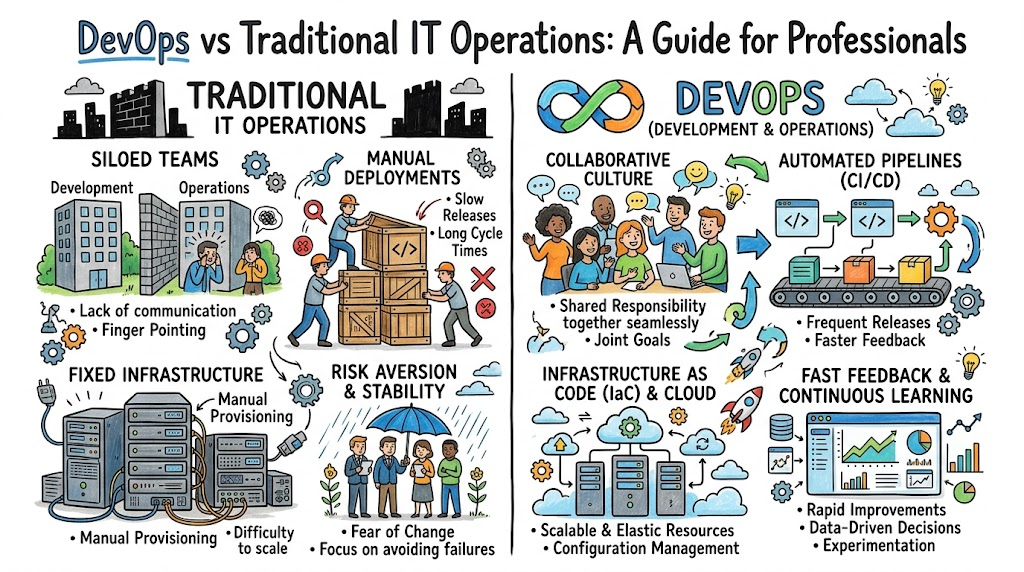
Traditional IT Operations is a model characterized by distinct, vertical silos. In this environment, the Development team (Dev) and the Operations team (Ops) operate as separate entities with different goals, KPIs, and processes.
The System Administration Model
In a traditional setup, the Ops team is often measured by stability and uptime. Their primary goal is to keep the environment unchanged because change introduces risk. Conversely, the Development team is measured by feature delivery and speed. This inherent conflict of interest leads to friction.
Manual Infrastructure Management
Traditional IT relies heavily on manual configuration. If an application needs more servers, an administrator logs into a console or command-line interface to provision a virtual machine, manually installs the OS, configures the network, sets up the application server, and deploys the code. This is error-prone, slow, and impossible to scale effectively.
The “Silo” Problem
Because Dev and Ops do not communicate effectively until a deployment is imminent, issues are discovered late. If a developer writes code that performs well on their laptop but fails in production due to a configuration mismatch, the “blame game” begins. This is the hallmark of traditional IT.
What Is DevOps?
DevOps is a philosophy, a culture, and a set of practices that aims to shorten the systems development life cycle and provide continuous delivery with high software quality. It is the antithesis of the siloed, traditional approach.
Collaboration First
At its core, DevOps breaks down the wall between development and operations. It forces teams to share accountability. If the production system crashes, it is a shared problem for the developers who wrote the code and the engineers who manage the infrastructure.
Automation-First Culture
DevOps minimizes human intervention. Instead of manually configuring servers, DevOps engineers write code to define infrastructure. This ensures that the environment is identical across development, testing, and production.
CI/CD and Cloud-Native Practices
DevOps relies on Continuous Integration (CI) and Continuous Delivery (CD) pipelines. When a developer pushes code, automated tests run immediately. If the tests pass, the code is automatically deployed to a staging environment, and potentially even production, with minimal human oversight.
Why Organizations Are Moving from Traditional IT to DevOps
The shift is not driven by the desire to use “cool” tools, but by economic and operational necessity.
- Faster Time to Market: Traditional models take weeks to release features. DevOps enables releasing multiple times a day.
- Business Agility: Companies must adapt to user feedback instantly. If a competitor releases a feature, you cannot wait three months to respond.
- Cloud Adoption: Cloud platforms are designed for automation. Managing AWS or Azure instances using manual traditional methods is inefficient and ignores the power of the cloud.
- Reducing “Mean Time to Recovery” (MTTR): In traditional IT, recovering from a failure involves manual troubleshooting. In DevOps, automation and observability allow teams to identify and fix issues in minutes.
DevOps vs Traditional IT Operations: Quick Comparison
| Area | Traditional IT Operations | DevOps |
| Team Structure | Siloed (Dev vs. Ops) | Cross-functional / Integrated |
| Collaboration | Low; handoffs are formal | High; shared accountability |
| Deployment Speed | Slow (Manual / Scheduled) | Fast (Continuous / Automated) |
| Infrastructure | Manual / Static | Infrastructure as Code (IaC) |
| Monitoring | Reactive (Alert-based) | Proactive (Observability) |
| Security | Added at the end (Gatekeeper) | Shift-Left (Integrated) |
| Change Mgmt | Manual approvals / Tickets | Automated / Policy-driven |
| Scalability | Fixed / Limited | Elastic / Cloud-native |
Team Structure: Silos vs Collaboration
In the traditional model, developers are often kept away from production environments for security or compliance reasons. While intended to maintain stability, this actually creates a knowledge gap. Developers do not understand how their code performs in production, and Ops teams do not understand the architecture of the applications they support.
In DevOps, we advocate for cross-functional teams. A team responsible for a product should include both developers and operations engineers (often called site reliability engineers). They participate in design sessions, planning, and incident post-mortems together. This shared context reduces misunderstandings and accelerates problem-solving.
Deployment Speed: Slow Releases vs Continuous Delivery
Traditional organizations often operate on a “waterfall” release cycle. They release software once a quarter or once a month. This requires a massive “deployment day” event where everyone is on edge, waiting for things to break.
DevOps uses CI/CD pipelines. This means that every time a developer commits code, a pipeline:
- Compiles the code.
- Runs unit tests.
- Performs security scans.
- Deploys to a testing environment.
Because the changes are small and incremental, the risk of failure is significantly lower. If something breaks, the rollback is almost instantaneous.
Infrastructure Management: Manual vs Automation
Imagine a system administrator named Dave. In a traditional setup, Dave spends his day SSHing into servers to install patches or fix memory leaks. If the company grows from 10 servers to 100, Dave needs to hire more people.
In a DevOps culture, we use Infrastructure as Code (IaC) tools like Terraform or Ansible. Instead of clicking buttons, we write configuration files that describe the state of the infrastructure. The automation tool then reads these files and makes the infrastructure match the definition. This means that scaling from 10 servers to 1,000 servers takes the same amount of time as scaling to 10: running the command.
Monitoring and Incident Response
Traditional IT: Reactive Monitoring
Traditional monitoring asks, “Is the server up?” It uses tools that send an email alert when a server is down. By the time the email arrives, the user has already experienced an outage.
DevOps: Proactive Observability
DevOps uses observability. Tools like Prometheus and Grafana provide deep insights into the health of the system. We don’t just look at whether the server is up; we look at request latency, error rates, and resource saturation. With modern ELK (Elasticsearch, Logstash, Kibana) stacks, we can correlate logs with metrics to find the root cause of a problem before it escalates into an outage.
Security Approach: Traditional Security vs DevSecOps
In traditional IT, security is the “gatekeeper.” Developers finish the code, hand it to security, and security breaks the code by flagging vulnerabilities. The project is delayed while developers scramble to fix it.
DevOps promotes DevSecOps (Shift-Left Security). Security tools are integrated into the pipeline. If a developer uses a library with a known vulnerability, the build fails automatically before the code is even merged. Security becomes a shared responsibility, not a final hurdle.
Change Management in Traditional IT vs DevOps
Traditional Change Management relies on a Change Advisory Board (CAB) that meets weekly to review spreadsheets and approve manual changes. It is a slow, bureaucratic process that often acts as a bottleneck.
DevOps replaces this with automated governance. Policies are defined as code. If a deployment passes all automated tests, security scans, and performance benchmarks, it is automatically approved. This provides a clear audit trail without human interference.
Scalability: Fixed Infrastructure vs Cloud-Native Systems
Traditional infrastructure is built for peak load. If you expect a spike in traffic once a year, you must buy hardware to support that peak, which sits idle the rest of the time.
DevOps leverages Cloud-Native principles. Using technologies like Kubernetes, the infrastructure automatically scales out when traffic is high and scales in when traffic is low. You pay for what you use, and the application remains performant regardless of the load.
Cost and Resource Efficiency
Traditional IT is expensive. You pay for the time of highly skilled administrators to do manual work, and you pay for over-provisioned hardware.
DevOps reduces costs by:
- Eliminating Toil: Automating manual tasks allows engineers to focus on high-value projects.
- Optimizing Cloud Spend: Auto-scaling ensures you only run the resources you need.
- Reducing Downtime: Fewer outages mean less revenue loss.
Real-World Example: Traditional IT Workflow
- Developer: Completes code on a local machine.
- Handover: Developer emails a deployment package or creates a ticket.
- Operations: Ops team reviews the ticket, takes 2 days to provision a server.
- Deployment: Ops manually deploys the code.
- Failure: Application crashes because the server config is different from the dev machine.
- Troubleshooting: Dev and Ops start an email thread to investigate.
- Resolution: 48 hours later, the issue is fixed.
Real-World Example: DevOps Workflow
- Developer: Commits code to a shared repository.
- Pipeline: Triggers automatically.
- Automation: Testing and security scans run in parallel.
- Infrastructure: If new infrastructure is needed, Terraform creates it.
- Deployment: Code is deployed to a staging environment.
- Verification: Automated smoke tests run.
- Production: Code is deployed to production.
- Monitoring: The system is under continuous observation; alerts trigger only if thresholds are breached.
Benefits of DevOps Over Traditional IT Operations
- Reliability: Automated processes are consistent and reduce human error.
- Speed: Faster time to market provides a competitive edge.
- Job Satisfaction: Engineers spend less time on manual “grunt work” and more time building impactful features.
- Transparency: Everyone has visibility into the state of the system.
Challenges of Moving from Traditional IT to DevOps
- Cultural Resistance: The biggest hurdle is convincing people to change how they work. It is easier to buy software than to change mindsets.
- Skill Gaps: Traditional sysadmins may need to learn coding (Python, Go) and cloud platforms.
- Legacy Systems: Old, monolithic applications are difficult to automate.
- Tool Complexity: The DevOps landscape is vast, and choosing the right stack can be overwhelming.
Solution: Start small. Pick one application, form a pilot team, and demonstrate success before scaling across the organization.
Common Beginner Misunderstandings
- Misunderstanding 1: “DevOps is just a set of tools.”
- Correction: DevOps is a culture. Buying Jenkins or Kubernetes does not make you a DevOps organization.
- Misunderstanding 2: “Traditional IT is dead.”
- Correction: Traditional IT principles (stability, security, architecture) are still vital. DevOps adds automation to these principles.
- Misunderstanding 3: “DevOps removes the need for Operations.”
- Correction: Ops is more important than ever. The role just evolves from “ticket closer” to “platform engineer.”
Best Practices for DevOps Adoption
- Adopt a Culture of Learning: Encourage failure as a way to learn, not a reason to punish.
- Automate Everything: If you do a task more than twice, automate it.
- Measure What Matters: Focus on DORA metrics (Deployment Frequency, Lead Time for Changes, Change Failure Rate, Time to Restore Service).
- Standardize: Use a common set of tools to prevent fragmentation.
- Invest in Training: Tools change rapidly; your team’s ability to learn is your most valuable asset.
Role of DevOpsSchool in Learning Modern DevOps Practices
Learning DevOps requires a balance between theoretical knowledge and practical application. Whether you are a system administrator transitioning to the cloud or a developer trying to understand infrastructure, you need hands-on exposure.
DevOpsSchool provides a learning ecosystem designed to bridge the gap between legacy operations and modern engineering. Through structured courses that focus on real-world scenarios—such as building resilient CI/CD pipelines, mastering cloud-native orchestration with Kubernetes, and automating infrastructure—students gain the confidence to implement these practices in their own organizations. The goal is not just to teach a tool, but to mentor students in the culture of automation and collaboration.
Industries Benefiting from DevOps Transformation
- Banking & Finance: Needs high compliance and security, but also needs to deploy updates daily. DevOps ensures compliance-as-code.
- Healthcare: Requires 99.999% uptime and strict data protection. Automation helps maintain constant availability.
- E-Commerce: Handles massive traffic spikes. DevOps allows elastic scaling to handle Black Friday levels of traffic effortlessly.
- SaaS Platforms: The entire business model depends on continuous delivery of features. DevOps is the backbone of SaaS.
- Telecom: Managing massive infrastructure networks becomes feasible only through automated, programmable infrastructure.
Career Opportunities in DevOps and IT Operations
The market demand for professionals who understand both software development and infrastructure operations is at an all-time high.
- DevOps Engineer: Focuses on the bridge between dev and ops.
- Cloud Engineer: Specializes in cloud platforms (AWS, Azure, GCP).
- Site Reliability Engineer (SRE): Uses software engineering to solve infrastructure problems.
- Platform Engineer: Builds internal tools that help other developers deploy their code easily.
- Automation Engineer: Focuses specifically on CI/CD and tooling.
Certifications & Learning Paths
| Certification | Best For | Skill Level | Focus Area |
| AWS/Azure Solutions Architect | Cloud Infrastructure | Intermediate | Cloud Design |
| CKA (Kubernetes Administrator) | Container Orchestration | Advanced | Kubernetes |
| Terraform Associate | IaC Automation | Beginner | Infrastructure as Code |
| DevOps Foundation | Process & Culture | Entry | DevOps Principles |
Start by building a portfolio of projects. Set up a CI/CD pipeline for a simple web application. Host it on a cloud provider. This practical experience is worth more than any certificate in an interview.
Future of IT Operations and DevOps
The future is heading toward Autonomous Operations. We are seeing the rise of:
- AI-Assisted Operations: AIOps tools will predict failures before they happen.
- Platform Engineering: Creating self-service platforms so developers can self-serve infrastructure without needing Ops intervention.
- GitOps: Managing infrastructure entirely through Git workflows.
- DevSecOps Maturity: Security will become invisible and integrated by default.
FAQs
1. What is the main difference between DevOps and Traditional IT Operations?
DevOps focuses on collaboration, automation, and continuous delivery, whereas Traditional IT Operations focuses on functional silos, manual processes, and stability through strict, human-managed change control.
2. Why are companies adopting DevOps?
To increase delivery speed, improve system reliability, and reduce operational costs while remaining competitive in a cloud-first market.
3. Does DevOps replace IT operations?
No. It evolves the role of IT operations from manual task execution to platform engineering and site reliability.
4. Is DevOps difficult to learn?
It has a learning curve because it requires knowledge of many tools. However, by breaking it down into manageable areas like CI/CD, Infrastructure as Code, and Cloud, it is very achievable.
5. Why is automation important in DevOps?
Automation removes human error, ensures consistency, and allows organizations to scale without linearly increasing staff headcount.
6. Is Kubernetes necessary for DevOps?
It is not mandatory, but it is the industry standard for container orchestration in modern DevOps environments.
7. Can system administrators move to DevOps?
Yes, they are often the best candidates because they already understand infrastructure, networking, and security. They just need to learn scripting and CI/CD tools.
8. Is DevOps a good career path?
Yes. It is one of the highest-paying and most stable career paths in the IT industry due to the high demand for modern operational skills.
9. What is “Shift Left”?
Moving tasks like security and testing earlier in the development lifecycle to catch issues sooner.
10. Do I need to be a programmer to do DevOps?
You don’t need to be a software developer building complex applications, but you must know how to script and understand code to manage infrastructure.
11. Is DevOps only for big tech companies?
No. DevOps principles apply to organizations of all sizes, from startups to large enterprises.
12. What is an SRE?
A Site Reliability Engineer is someone who uses software engineering approaches to solve operations problems. It is essentially DevOps “at scale.”
13. How does DevOps affect security?
It makes security an integral part of the development process rather than a separate phase at the end.
14. What are DORA metrics?
They are the industry-standard metrics (Deployment Frequency, Lead Time, Change Failure Rate, Time to Restore) used to measure DevOps performance.
15. Can I implement DevOps without cloud?
Yes, but it is significantly more difficult to automate hardware compared to virtualized or cloud-based resources.
Final Thoughts
DevOps is not a product you buy or a certification you pass. It is a commitment to continuous improvement. If you are currently in a traditional IT role, do not feel discouraged. Your experience with how systems work, how networks fail, and how security is maintained is the foundation upon which great DevOps practices are built.
The transition from traditional IT operations to DevOps is an evolution. Start by identifying the most painful, manual task in your daily workflow. Automate it. Then move to the next. Collaborate with your developers rather than viewing them as adversaries. Build, measure, learn, and iterate. That is the essence of the DevOps journey.